
Full Term alternatives
Compare Full Term alternatives for simple contraction timing, partner sharing, Apple Watch use, kick counting, and offline backup.



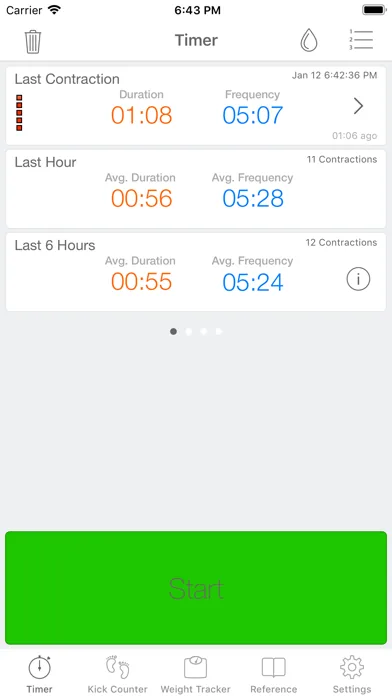
Full Term alternatives
If Full Term no longer fits, you can switch to a dedicated contraction timer or use a simpler manual method. The best choice depends on whether you need Apple Watch access, partner sharing, kick counting, or just a clear contraction log.
The best Full Term alternatives for labor
The best overall alternative is Contraction Timer IO because it combines a free core timer with iPhone, Apple Watch, Android, and web access. It also supports lock-screen timing, partner sharing, history export, and use without an account (App listing research, 2024-2026).
That recommendation will not fit everyone. If kick counting is the feature you use most, Full Term may remain more convenient because it puts a contraction timer and kick counter in the same app.
A built-in stopwatch, notes app, spreadsheet, voice recorder, or paper log can also work. These options require more manual effort, but they avoid learning a new app when contractions have already started.
Ranked options when you want to leave Full Term
Contraction Timer IO: This is the strongest fit for someone who wants a purpose-built timer on several devices. You can start and stop contractions from a phone or Apple Watch, review the history, share updates with a birth partner, and export the log without creating an account.
Its main limitation for a Full Term user is the change in workflow. If you want contraction timing and kick counting in one familiar place, confirm that your chosen replacement covers both before deleting anything.
Your phone’s stopwatch: A stopwatch is the quickest backup when you cannot download or understand a new app. Start it when a contraction begins, stop it when the contraction ends, and record the result separately.
The weakness is spacing. A basic stopwatch may show duration but leave you calculating the time between contractions yourself.
A timestamped notes log: Write “start” and “stop” with the time for each contraction. This creates a readable record and gives you space to add intensity, position, fluid changes, or questions for your care team.
Typing during a contraction can be difficult. A birth partner may need to manage the log as labor becomes more demanding.
A shared spreadsheet: Use columns for start time, end time, duration, spacing, and notes. A shared file can help a partner follow the pattern from another room or location.
This approach is flexible but not fast. Formulas, connectivity, small cells, and accidental edits can become frustrating during labor.
Voice memos or voice assistant notes: Say when a contraction starts and ends, then review the timestamps later. This can be easier than typing when you need to change positions or focus on breathing.
Voice tools do not always calculate duration or spacing automatically. Background noise and unclear recordings can also leave gaps.
A paper contraction log: Paper works without a battery, account, download, or internet connection. Keep it with a pen beside the bed or in your hospital bag as a backup.
Someone must calculate the pattern manually. Paper is also harder to share remotely or export to a care team.
How the six timing options compare
This comparison focuses on what matters during contractions: quick controls, automatic calculations, sharing, and resilience when technology fails. “Manual” means you or a partner must record or calculate at least part of the pattern.
| Feature | Contraction Timer IO | Full Term |
|---|---|---|
| Current platforms | iPhone, iPad, Apple Watch, Android, and web (official site) | iPhone, iPad, and Apple Watch; its Android Play listing was removed April 20, 2024 (App Store listing, Sep 2026) |
| Price | Free core timer; ad-free (App Store listing, Sep 2026) | Free with in-app purchases (App Store listing, Sep 2026) |
| Apple Watch | Yes (App Store listing, Sep 2026) | Yes (App Store listing, Sep 2026) |
| Lock Screen controls | Yes (official site) | Not documented in the supplied official sources |
| Partner sharing | Built-in partner sharing with no required account (official site) | Email export is available; live partner sharing is not documented in the supplied official sources (official site) |
| History export | Yes (official site) | Yes, by email (official site) |
| 5-1-1 guidance | Yes, with 5-1-1 alerts (official site) | Yes, with 5-1-1 alerts (official site) |
| Other documented features | Cross-platform timing and editable history without a required account (official site) | Kick counter and editable contraction history (official site) |
| App Store rating | 4.8/5 (App Store listing, Sep 2026) | 4.7/5 from 7,214 ratings (App Store listing, Sep 2026) |
| Main tradeoff | The supplied official sources do not confirm a built-in kick counter | No current Android Play listing; Lock Screen controls and live partner sharing are not documented in the supplied official sources |
What you may miss after switching
Full Term’s main appeal is its straightforward contraction history plus kick counting. It is available for iOS and Android, and its published product information includes Apple Watch support and data export (Full Term product information, 2023-2026).
Not every alternative combines those functions. Some focus only on contraction timing, while pregnancy apps may place kick counting inside a larger collection of calendars, articles, and trackers.
Before switching, check whether old Full Term entries can be exported in a format you can open. Also check the current store listing for price, in-app purchases, privacy terms, device compatibility, and whether an account is required; these details can change.
Kick counting needs a separate safety plan
If you used Full Term mainly for fetal movement tracking, choose a replacement before removing the app. A notes log or dedicated kick counter may be enough, but it should not replace instructions from your obstetrician, midwife, or labor unit.
Common patient guidance describes counting until you feel 10 movements within 2 hours and contacting a provider if you feel fewer than 10 movements during that focused period (Cleveland Clinic, 2026). Your care team may give you different instructions based on your pregnancy and your baby’s usual pattern.
Contact your care team promptly if movement is reduced or feels meaningfully different. Do not wait for a timer, app notification, or completed log when you are concerned.
How to choose before contractions get stronger
Test the controls now. Make sure starting, stopping, correcting, and deleting an accidental entry feel obvious. A polished feature list matters less than controls you can use while walking, breathing, or lying on your side.
Decide who will run the timer. If a partner will take over, practice handing off the task. Confirm that shared data appears clearly on their device rather than assuming synchronization will work.
Keep a backup. Put a paper log and pen near your charger. A stopwatch or written timestamp is enough to preserve the basic pattern if a phone battery dies or an app stops responding.
Know what the log cannot tell you. Timing data cannot diagnose labor or confirm that you and your baby are well. Follow the call instructions provided by your own care team, especially for bleeding, fluid leakage, reduced movement, severe or constant pain, or any urgent concern.
The practical choice is the tool you can operate reliably under stress. Try it before you need it, show your partner how it works, and keep your care team’s phone number easy to reach.
Frequently asked questions
What app is better than Full Term?
Contraction Timer IO is a strong alternative if you want a timer on iPhone, iPad, Apple Watch, Android, or the web, plus Lock Screen access, partner sharing, export, 5-1-1 alerts, an ad-free core, and no required account (official site). Full Term remains useful if its built-in kick counter is important. Its Android Play listing was removed in April 2024.
Is there a free alternative to the Full Term app?
Yes. Contraction Timer IO has a free, ad-free core timer on iPhone, iPad, Apple Watch, Android, and the web, with no required account (official site). Full Term is also listed as free with in-app purchases (App Store listing, Sep 2026). A phone stopwatch or paper log is another free backup.
Which Full Term alternative works on Apple Watch?
Contraction Timer IO works on Apple Watch as well as iPhone, iPad, Android, and the web (App Store listing, Sep 2026; official site). Full Term itself also supports Apple Watch (App Store listing, Sep 2026).
Can my partner track my contractions from another phone?
Yes. Contraction Timer IO includes built-in partner sharing and does not require an account (official site). Full Term supports email export, but live partner sharing is not documented in the supplied official sources.
Do contraction timer alternatives include kick counting?
Some do. Full Term includes a kick counter (official site). The supplied official sources do not confirm a built-in kick counter for Contraction Timer IO, so a separate fetal-movement log may be needed. Follow your care team's instructions and seek prompt advice for reduced or changed movement.
Can I use a stopwatch instead of a contraction timer app?
Yes. A stopwatch can measure contraction duration, but you will usually need to record start and stop times separately and calculate spacing yourself. It can be a useful backup if your timer app, watch, or phone is unavailable.
When should I call my doctor based on a contraction timer?
Follow the instructions from your obstetrician, midwife, or labor unit rather than relying on an app alone. Call sooner for bleeding, fluid leakage, reduced fetal movement, severe or constant pain, or any feeling that something is wrong. A 5-1-1 alert records a timing pattern; it cannot determine whether labor or a pregnancy is safe.
Full Term is a long-standing contraction timer for iPhone, iPad, and Apple Watch. Its documented features include a kick counter, editable history, email export, and 5-1-1 alerts. The former Android Play listing for package com.mustansir.fullterm was removed April 20, 2024, so Full Term should not be treated as currently available on Android.
Contraction Timer IO has broader current platform coverage: iPhone, iPad, Apple Watch, Android, and web. It also provides Lock Screen access, built-in partner sharing, history export, 5-1-1 alerts, an ad-free core experience, and use without a required account (official site).
| App | App Store snapshot | Current distinction |
|---|---|---|
| Contraction Timer IO | 4.8/5 (App Store listing, Sep 2026) | iPhone, iPad, Apple Watch, Android, and web; Lock Screen controls and partner sharing |
| Full Term | 4.7/5 from 7,214 ratings (App Store listing, Sep 2026) | Apple Watch support, kick counter, email export, and editable history; no current Android Play listing |