
Contraction Timer IO vs Storky Contraction Timer
Compare Storky with a dedicated contraction timer across iPhone, Android, Apple Watch, web access, sharing, history, and cost.


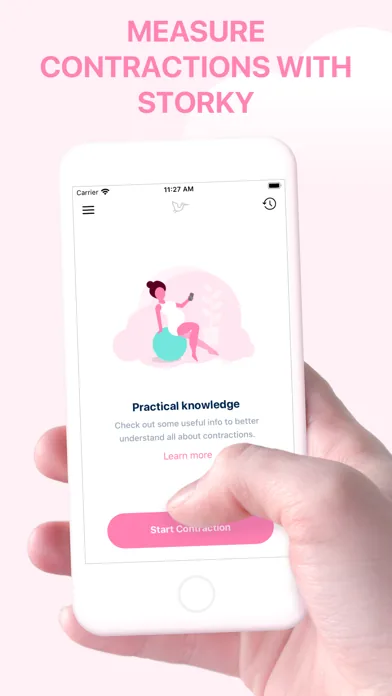
Contraction Timer IO vs Storky Contraction Timer
Contraction Timer IO vs Storky comes down to where and how you want to time labor. Both cover basic contraction timing, but the dedicated option has broader device access, sharing, and history tools, while Storky keeps the experience simpler.
Contraction Timer IO vs Storky Contraction Timer: which is better?
The dedicated timer is the better fit if you want to start on one device, involve a birth partner, or keep a record that can be shared. It supports iPhone, iPad, Apple Watch, Android, and the web, according to the supplied product research.
Storky is a reasonable choice if you want a straightforward timer on iOS or Android and do not need confirmed watch, lock-screen, sharing, or export features. Those features are not established for Storky in the supplied competitor research, so check its current store listing before relying on them.
The research provided for this comparison describes Storky as a contraction timer, not as a pregnancy tracker containing a timer. If you have seen a larger pregnancy app with a similar name, confirm the publisher and exact listing before downloading.
Feature comparison at a glance
The main difference is not whether each app can time contractions. It is what happens around that timer: which screen you can use, whether someone else can help, and what you can do with the resulting history.
| Feature | Contraction Timer IO | Storky Contraction Timer |
|---|---|---|
| Primary purpose | Dedicated contraction timer | Dedicated contraction timer |
| Platforms | iPhone, iPad, Apple Watch, Android, and web | iPhone, iPad, and Android |
| Apple Watch | Supported | No Apple Watch app listed |
| Web timer | Available | No web timer listed |
| Lock-screen timing | Supported | Not documented by the official site or store listing |
| Partner sharing | Supported | Supported, including sharing a contraction overview |
| History export | Supported | Supported through email or other sharing options |
| 5-1-1 guidance | 5-1-1 alerts | Labor-pattern guidance based on the 5-1-1 rule |
| Account required | No | No |
| Price | Free core timer | Free with in-app purchases |
| Advertising | Ad-free core | Ad-free |
| US App Store rating | 4.8/5 | 4.9/5 from 1,885 ratings |
A feature marked “not established” is not the same as unavailable. It means the research did not provide enough evidence to make that claim.
Device access is the clearest difference
Storky covers the two main phone platforms, making it suitable for someone who expects to time every contraction from an iPhone or Android phone. Its supplied research does not confirm an Apple Watch app, a web timer, or lock-screen controls.
The dedicated alternative gives you more ways to reach the timer. Watch support can reduce the need to find and unlock a phone, while lock-screen access can make repeated starts and stops less disruptive.
Web access also gives a birth partner another option when a phone is charging, being used for calls, or packed for the hospital. This flexibility matters most when the person having contractions does not want to manage the log personally.
Device support can change after an app update. Install your preferred option before labor, open it on the devices you plan to use, and make sure you understand its start, stop, edit, and reset controls.
Sharing and history matter for birth partners
A contraction log is most useful when it stays accurate without demanding constant attention. Partner sharing lets another person handle timing or follow the pattern, while export provides a practical way to preserve or show the history.
The dedicated timer’s supplied research confirms partner sharing, full history, and export. It also says no account is required, which can reduce setup when you want to begin quickly.
Storky’s research does not establish partner sharing, export, or whether an account is required. Do not assume those tools are missing, but verify the current listing and test the workflow if they are important to your plan.
Neither an app nor a clean contraction pattern can determine whether you are in labor. Follow the instructions from your obstetrician, midwife, hospital, or birth center, especially if you have bleeding, fluid leakage, reduced fetal movement, severe pain, or another urgent concern.
Simple timing versus a broader labor workflow
Storky’s strongest documented angle is simplicity. The supplied competitor research calls it a straightforward contraction timer available on iOS and Android, with notifications related to contraction patterns.
There is not enough supplied evidence to describe Storky as a full pregnancy tracker. Its documented purpose is narrower, so this comparison should not be treated as a choice between a pregnancy-content app and a timer.
The dedicated alternative builds more workflow around the same basic task. Cross-platform access, watch and lock-screen controls, partner sharing, history, and export are useful if timing may move between people or devices.
Pricing should not be the deciding factor here because both have free access with in-app purchases listed. The supplied Storky research conflicts on advertising, describing the core app as ad-free in one place while another entry mentions an optional purchase related to ads or premium access. Check the current listing for the version available in your region.
Who should choose each timer
Choose Storky if you want a basic phone-based contraction timer and prefer a smaller documented feature set. It may be enough when one person will use one phone and sharing or exporting the log is not essential.
Choose the dedicated option if Apple Watch access, lock-screen timing, a browser-based backup, partner involvement, or an exportable history matters. It is also the clearer choice for households using a mix of Apple and Android devices.
- Pick Storky for simple timing on iOS or Android.
- Pick the dedicated timer for broader device access.
- Favor the dedicated timer when a birth partner will help track contractions.
- Verify Storky’s current advertising, account, sharing, and export details before labor.
- Practice with either timer in advance so starting, stopping, editing, and clearing entries feel familiar.
The verdict is practical rather than absolute. Storky covers the core job, while the dedicated alternative is better documented for a multi-device and partner-supported labor workflow.
Frequently asked questions
Is Storky a pregnancy tracker or a contraction timer?
Storky is a dedicated contraction timer rather than a full pregnancy tracker. It records contraction timing and history, supports sharing, and provides labor-pattern guidance based on the 5-1-1 rule (Storky official site and App Store listing, Sep 2026).
Which contraction timer works with Apple Watch?
Contraction Timer IO supports Apple Watch in addition to iPhone, iPad, Android, web, and Lock Screen timing. Storky’s App Store listing names iPhone and iPad but does not list an Apple Watch app (App Store listings, Sep 2026).
Can my partner time contractions from another device?
Contraction Timer IO supports partner sharing and web access, while Storky supports sharing a contraction overview or history through email and other sharing options. Storky’s official sources do not document remote start and stop controls for a partner, so its confirmed sharing feature should not be treated as live remote timing (official sites and App Store listings, Sep 2026).
Does Storky work on Android and iPhone?
Yes. Storky is available for iPhone, iPad, and Android. Contraction Timer IO also supports those platforms and adds Apple Watch and a web timer (official sites and store listings, Sep 2026).
Which app is free and ad-free?
Both offer an ad-free experience. Contraction Timer IO has a free, ad-free core timer. Storky is free with in-app purchases and is listed as ad-free (official sites and store listings, Sep 2026).
Do I need an account to time contractions?
No. Neither Contraction Timer IO nor Storky requires an account for contraction timing (official sites and store listings, Sep 2026).
Which timer should I use when contractions start?
Choose Storky for a simple iPhone, iPad, or Android timer with sharing, export, and 5-1-1-based guidance. Choose Contraction Timer IO if you also want Apple Watch, web and Lock Screen access, partner sharing, export, no account, an ad-free core, and 5-1-1 alerts. Practice with the app before labor, and follow your maternity care team’s instructions about when to call or travel to your birth location.
Both apps are dedicated contraction timers available on iPhone, iPad, and Android, with no account required and an ad-free experience. Both provide partner sharing, history sharing or export, and guidance based on the 5-1-1 labor pattern. Contraction Timer IO additionally supports Apple Watch, a web timer, Lock Screen timing, and 5-1-1 alerts. Storky’s official listings do not list an Apple Watch app, web timer, or Lock Screen controls. Sources: Contraction Timer IO official site, Storky official site, and App Store listings (Sep 2026).
| App | US iOS rating | Ratings |
|---|---|---|
| Contraction Timer IO | 4.8/5 | 76 |
| Storky Contraction Timer | 4.9/5 | 1,885 |
Rating source: App Store listings, Sep 2026.