
Contraction Timer IO vs The Bump
Compare a dedicated contraction timer with The Bump’s pregnancy hub, including devices, sharing, history, pricing, and best use cases.


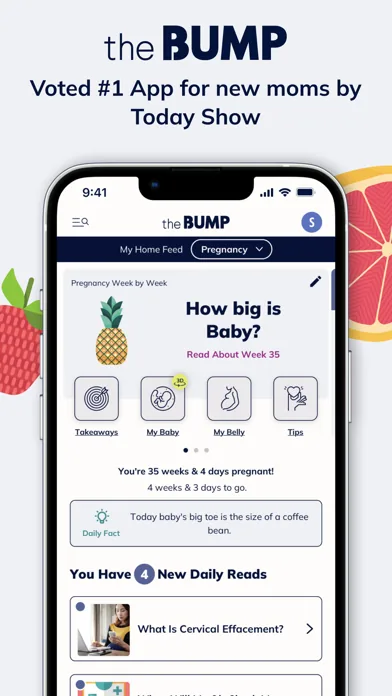
Contraction Timer IO vs The Bump
Contraction Timer IO is the stronger choice for focused labor timing across phones, Apple Watch, and the web. The Bump is better if you want contraction timing inside a broader pregnancy and baby information app.
Contraction Timer IO vs The Bump: quick answer
Choose the dedicated timer if fast access, Apple Watch timing, lock-screen controls, partner sharing, and an exportable history matter most. Choose The Bump if you already use its week-by-week pregnancy content, planning tools, and registry features and only need a timer as part of that larger app.
Both options are available on iOS and Android. The dedicated option also has a web timer and Apple Watch support, while current research does not establish Apple Watch or web-timer support for The Bump.
The Bump is free, with no premium tier mentioned in its official materials. The dedicated timer’s core features are also free and ad-free, although its store listings include optional in-app purchases.
Neither product can determine whether you are in active labor or when you should leave for your birth location. Use the recorded pattern as information to share with your maternity care team, and follow the personalized instructions they gave you.
Feature-by-feature comparison
The central difference is specialization. One product is designed around recording labor patterns; the other places a contraction timer inside a pregnancy and baby content hub.
| Comparison point | Contraction Timer IO | The Bump |
|---|---|---|
| Primary purpose | Dedicated contraction timing, labor history, pattern tracking, and 5-1-1 alerts | Pregnancy and baby tracking with educational content, registry tools, a kick counter, and a built-in contraction timer |
| Platforms | iPhone, iPad, Apple Watch, Android, and web (official site) | iPhone, iPad, and Android (App Store listing, Sep 2026; official site) |
| Core price | Free core timer; ad-free (official site) | Free; contains ads (App Store listing, Sep 2026) |
| Apple Watch | Supported (official site) | Apple Watch support is not documented in the supplied official sources |
| Lock Screen timing | Supported on iPhone (official site) | Lock Screen timing is not documented in the supplied official sources |
| Partner sharing | Supported (official site) | Supported (official site) |
| History export | Supported (official site) | Supported (official site) |
| Account requirement | No account required (official site) | The supplied official sources do not state whether an account is required |
| App Store rating | 4.8/5 (App Store listing, Sep 2026) | 4.8/5 from 39,657 ratings (App Store listing, Sep 2026) |
| Best fit | People and birth partners who want a focused, cross-platform, ad-free labor timer with Apple Watch and Lock Screen access, sharing, export, and 5-1-1 guidance | Expecting and new parents who want a free pregnancy and baby tracker that includes contraction timing alongside broader content and planning tools |
A missing competitor feature is not necessarily proof that it does not exist. Where the research provides no answer, check the latest App Store or Google Play listing before relying on that feature.
Difference 1: focused labor tool or pregnancy content hub
The dedicated option keeps the experience centered on starting, stopping, reviewing, and sharing contractions. That narrower scope can reduce searching through unrelated content when contractions demand your attention.
The Bump is built for a longer part of the pregnancy journey. Its week-by-week information, baby tracking, planning content, and registry tools may be more valuable before labor or for someone who wants fewer separate pregnancy apps.
This creates a practical tradeoff. A broad hub keeps information together, but a specialized timer may be easier to hand to a birth partner with minimal explanation. Preference matters here: some people want a familiar pregnancy app, while others want a screen devoted to the immediate task.
Difference 2: Apple Watch, lock screen, and web access
The dedicated timer supports iPhone, iPad, Apple Watch, Android, and a browser-based timer. Apple Watch and lock-screen support can be useful when reaching for and unlocking a phone feels inconvenient.
The web option also gives a birth partner another way to open a timer without installing a mobile app. It may help when the pregnant person and partner use different phone platforms or when a nearby computer is easier to access.
The Bump is available for iPhone and Android. The supplied competitor research does not establish Apple Watch, lock-screen, or browser-timer support, so do not assume those options are available without checking its current store listing.
Device support should not outweigh reliability on the device you will actually use. Install your preferred option before labor, open it, and make sure both you and your partner understand how to start, stop, edit, and review a contraction.
Difference 3: partner sharing and labor records
Partner sharing can move the tapping and note-taking away from the person having contractions. The dedicated option supports partner sharing, an editable full history, and exporting records without requiring an account.
That combination is useful if a partner is tracking from another device or if you want to show a clear history to a nurse, midwife, or doctor. Export also provides a way to preserve the session outside the timer.
The available research does not confirm partner sharing, export, or the account requirement for The Bump. These details may vary as the app changes, so check the current listing and test the workflow rather than discovering a limitation during labor.
Records are only as accurate as the taps. Missed starts, late stops, phone handoffs, and accidental entries can distort the pattern, so treat the history as a practical log rather than a medical measurement.
Who should pick each option, and the verdict
Pick the dedicated timer if contraction tracking is your priority. It is the clearer fit for Apple Watch use, lock-screen access, browser timing, partner sharing, export, and use without an account.
Pick The Bump if you already use it for pregnancy information and want to avoid adding another app. Its broader content and planning tools give it value beyond labor, and its included timer may be enough for straightforward tracking from a phone.
- Choose the dedicated option when a birth partner needs to follow or manage the same labor record.
- Choose it when you want to time from an Apple Watch, lock screen, Android phone, iPhone, or web browser.
- Choose The Bump when pregnancy content, baby tracking, and registry tools are as important as contraction timing.
- Choose The Bump when familiarity with an app you already use matters more than specialized timing features.
Overall, the dedicated timer wins this comparison for labor itself, while The Bump wins for breadth. Test the option you choose before contractions become demanding, keep your care team’s contact instructions available, and never let an app delay seeking help when something feels wrong.
Frequently asked questions
Which is better for timing contractions, Contraction Timer IO or The Bump?
Contraction Timer IO is the stronger fit for focused labor timing. Its free, ad-free core supports iPhone, iPad, Apple Watch, Android, the web, iPhone Lock Screen timing, partner sharing, history export, 5-1-1 alerts, and use without an account (official site). The Bump is better suited to people who want a contraction timer within a broader pregnancy and baby app with educational content, registry tools, and a kick counter.
Does The Bump have a contraction timer?
Yes. The Bump includes a contraction timer within its broader pregnancy and baby tracking app. It is available for iPhone, iPad, and Android and also provides pregnancy content, registry tools, and a kick counter (official site; App Store listing, Sep 2026).
Can I time contractions from an Apple Watch with either app?
Contraction Timer IO supports contraction timing on Apple Watch (official site). The Bump's supplied official platform information lists iPhone, iPad, and Android, but does not document Apple Watch support.
Do both contraction timers work on iPhone and Android?
Yes. Contraction Timer IO and The Bump are both available for iPhone and Android. Contraction Timer IO additionally supports iPad, Apple Watch, and the web, while The Bump also supports iPad (official site; App Store listing, Sep 2026).
Can my partner track contractions from another device?
Yes. Both Contraction Timer IO and The Bump support partner sharing. Contraction Timer IO is designed as a focused labor timer and also supports Apple Watch, web access, Lock Screen timing, and use without an account (official sites).
Can I export my contraction history to show my care team?
Yes. Both Contraction Timer IO and The Bump support export. A saved history can help you describe contraction timing and patterns to your care team, but it is not a diagnosis and should not replace guidance from your doctor, midwife, or hospital (official sites).
Can a contraction timer tell me when to go to the hospital?
No contraction timer can safely make that decision for everyone. Contraction Timer IO provides 5-1-1 alerts to identify a commonly used contraction pattern, but when to seek care depends on your care team's instructions, pregnancy history, symptoms, and distance from care. Contact your maternity team promptly if you are concerned or something feels wrong.
Contraction Timer IO is a dedicated, ad-free contraction timer for iPhone, iPad, Apple Watch, Android, and the web. It supports iPhone Lock Screen timing, partner sharing, history export, 5-1-1 alerts, and use without an account (official site).
The Bump is a broader pregnancy and baby tracker for iPhone, iPad, and Android. Its tools include pregnancy content, registry features, a kick counter, and a built-in contraction timer. Partner sharing and export are supported, while Apple Watch and Lock Screen timing are not documented in the supplied official sources (official site; App Store listing, Sep 2026).
The Bump is free and contains ads. Contraction Timer IO provides a free, ad-free core timer. App Store ratings are time-stamped snapshots and can change.
| App | App Store rating | Ratings |
|---|---|---|
| Contraction Timer IO | 4.8/5 | 76 (Sep 2026) |
| The Bump | 4.8/5 | 39,657 (Sep 2026) |