
Contraction Timer IO vs Full Term
Compare contraction timing, kick counting, Apple Watch support, sharing, exports, and platform access to choose the right labor timer.


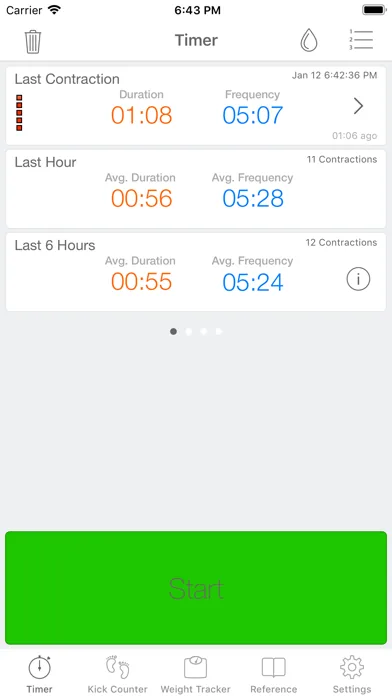
Contraction Timer IO vs Full Term
Contraction Timer IO vs Full Term comes down to labor-focused access versus an extra pregnancy tool. Both cover basic contraction timing, but their secondary features suit different needs.
Contraction Timer IO vs Full Term: the quick answer
Choose Contraction Timer IO if you want to time contractions across iPhone, Apple Watch, Android, or a web browser, especially if a birth partner needs to follow along. Its researched strengths are lock-screen timing, partner sharing, exportable history, and no required account.
Choose Full Term if you want a straightforward contraction log and a kick counter in the same app. It runs on iOS and Android, supports Apple Watch, and can export contraction history (Full Term App Store, 2023-2026).
Neither choice is automatically better for every labor. IO is more flexible for switching devices and sharing, while Full Term combines contraction timing with fetal movement tracking. Current pricing details can change, so check the relevant store listing before downloading.
Feature-by-feature comparison
| Feature | Contraction Timer IO | Full Term |
|---|---|---|
| Platforms | iPhone, iPad, Apple Watch, Android, and web (official site; App Store listing, Sep 2026) | iPhone, iPad, and Apple Watch. Its Android Play listing was removed in April 2024 (official site; App Store listing, Sep 2026) |
| Core timer price | Free, with an ad-free core experience (official site; App Store listing, Sep 2026) | Free with in-app purchases (App Store listing, Sep 2026) |
| Apple Watch | Supported (official site; App Store listing, Sep 2026) | Supported (App Store listing, Sep 2026) |
| Lock-screen timing | Supported (official site) | Not documented in the provided research |
| Partner sharing | Supported (official site) | Not documented in the provided research |
| History export | Supported (official site) | Supported, including email export (official site; App Store listing, Sep 2026) |
| 5-1-1 guidance | 5-1-1 alerts supported (official site) | 5-1-1 alerts supported (official site; App Store listing, Sep 2026) |
| Kick counter | Not documented in the provided research | Included (official site; App Store listing, Sep 2026) |
| Account requirement | No account required (official site) | Not documented in the provided research |
| App Store rating | 4.8/5 (App Store listing, Sep 2026) | 4.7/5 from 7,214 ratings (App Store listing, Sep 2026) |
The table reflects documented features rather than assumptions. A blank in the research does not prove that Full Term lacks a feature; it means you should verify the current App Store or Google Play listing.
Difference: timing contractions during labor
A labor timer should make starting and stopping a contraction easy when concentration is limited. Both apps provide the essential contraction log, including duration and spacing, so either can handle the basic job.
IO offers more ways to reach that timer. Apple Watch and lock-screen support can reduce the need to unlock a phone, while the web timer provides another option if the phone is charging, unavailable, or being used by someone else.
Full Term also supports Apple Watch, which may be enough if you already plan to use an iPhone and watch together. The supplied research does not establish lock-screen support for Full Term, so confirm that point in the current listing if it matters to you.
Difference: kick counting between contractions
Full Term’s clearest extra is its kick counter. That can be convenient if you want fetal movement tracking and contraction timing in one app rather than keeping separate tools.
Kick-count guidance is not identical everywhere. Some protocols use a threshold of 10 movements within 2 hours (Cleveland Clinic, 2026), while NHS guidance says there is no universal daily number and emphasizes knowing your baby’s usual pattern (NHS, 2020).
An app cannot decide whether a change in movement is safe. Follow the method given by your obstetrician or midwife, and contact your maternity unit promptly if movement decreases or the normal pattern changes. Do not wait for a timer or counter to provide reassurance.
Difference: sharing, history, and device access
Partner sharing is the practical dividing line. IO documents partner sharing, allowing another person to follow the contraction record rather than repeatedly asking for timing details. This may be useful when a partner is packing, driving, calling the care team, or tracking the pattern from another room.
Both apps document history export. An export can make the log easier to review, but it does not turn contraction data into a diagnosis or guarantee that labor has reached a particular stage.
The supplied research does not establish partner sharing for Full Term. It also does not establish whether Full Term requires an account, while IO states that no account is needed. Check the latest privacy information if cloud storage, sign-in, or data sharing affects your choice.
Who should choose each timer
Pick IO when several devices or people may be involved. It is the stronger fit for someone who wants a browser fallback, partner access, lock-screen controls, Apple Watch timing, and exportable history without creating an account.
Pick Full Term when you want a simple labor log plus kick counting. It also makes sense if you already use its interface, want Apple Watch support, or prefer keeping fetal movement records and contractions in the same app.
Install and test your choice before labor if possible. Practice starting a contraction, stopping it, correcting an accidental entry, finding the history, and sharing or exporting the log. Store features and in-app purchase terms can change, so verify anything essential on your device.
Verdict for labor-day use
Contraction Timer IO is the more flexible labor-only choice because it covers more access points and documents partner sharing. Full Term is the better fit when an integrated kick counter is a priority.
The final decision should depend on what you can operate quickly under pressure. Neither app can confirm active labor or tell you that it is safe to remain at home. Use the contraction record as information, then follow the personalized call and arrival instructions from your care team.
Frequently asked questions
Which contraction timer is better for Apple Watch?
Both Contraction Timer IO and Full Term support Apple Watch. IO also documents Lock Screen timing, partner sharing, browser access, history export, and 5-1-1 alerts. Full Term combines watch-based contraction timing with a kick counter and editable history. Sources: official sites and App Store listings, Sep 2026.
Does Full Term include a kick counter?
Yes. Full Term includes a kick counter alongside its contraction timer. Follow your maternity care team's instructions about monitoring fetal movement rather than relying on an app alone. Source: Full Term official site and App Store listing, Sep 2026.
Can my birth partner follow my contractions remotely?
Contraction Timer IO supports partner sharing. Partner sharing is not documented for Full Term in the provided research. Sharing can help with coordination, but it does not replace communication with your maternity care team. Source: Contraction Timer IO official site.
Can I use either contraction timer on Android?
No. Contraction Timer IO is currently available on Android as well as iPhone, iPad, Apple Watch, and the web. Full Term's Android Play listing was removed in April 2024, so Full Term should not be treated as currently available on Android. Sources: official sites and store listings.
Can I export my contraction history from both apps?
Yes. History export is documented for Contraction Timer IO, while Full Term supports email export and editable history. An exported log can help communicate observed timing, but it is not a clinical assessment. Sources: official sites and App Store listings, Sep 2026.
Will either app tell me when to go to the hospital?
Both Contraction Timer IO and Full Term provide 5-1-1 alerts or guidance. These alerts identify a contraction pattern; they do not replace personalized instructions from an obstetrician, midwife, hospital, or birth center. Contact your care team as directed and seek urgent help for an emergency rather than waiting for an app alert. Sources: official sites and App Store listings, Sep 2026.
Which app is simpler to use during labor?
That depends on which controls reduce effort for you. Contraction Timer IO offers Apple Watch and Lock Screen timing, partner sharing, web access, export, and no required account. Full Term offers Apple Watch timing, a kick counter, editable history, and email export. Try the start, stop, history, and correction controls before labor and choose the interface you find clearest. Sources: official sites and App Store listings, Sep 2026.
Contraction Timer IO provides a free, ad-free core timer on iPhone, iPad, Apple Watch, Android, and the web. It also documents Lock Screen timing, partner sharing, history export, 5-1-1 alerts, and use without an account (official site; App Store listing, Sep 2026).
Full Term is currently documented for iPhone, iPad, and Apple Watch, with a kick counter, editable history, email export, and 5-1-1 alerts. Its Android Play listing for package com.mustansir.fullterm was removed in April 2024, so Full Term should not be treated as currently available on Android (official site; App Store listing, Sep 2026).
The provided research does not document Lock Screen timing, partner sharing, or the account requirement for Full Term.
| Published figure | Contraction Timer IO | Full Term |
|---|---|---|
| App Store rating | 4.8/5 | 4.7/5 |
| App Store ratings | 76 | 7,214 |
| Listed price | Free core timer; ad-free | Free with in-app purchases |
Rating and pricing figures are from the respective App Store listings, Sep 2026.