
Contraction Timer IO vs Bump Pulse
Compare partner sharing, web access, Apple Watch support, history, exports, pricing, and privacy before choosing a contraction timer.


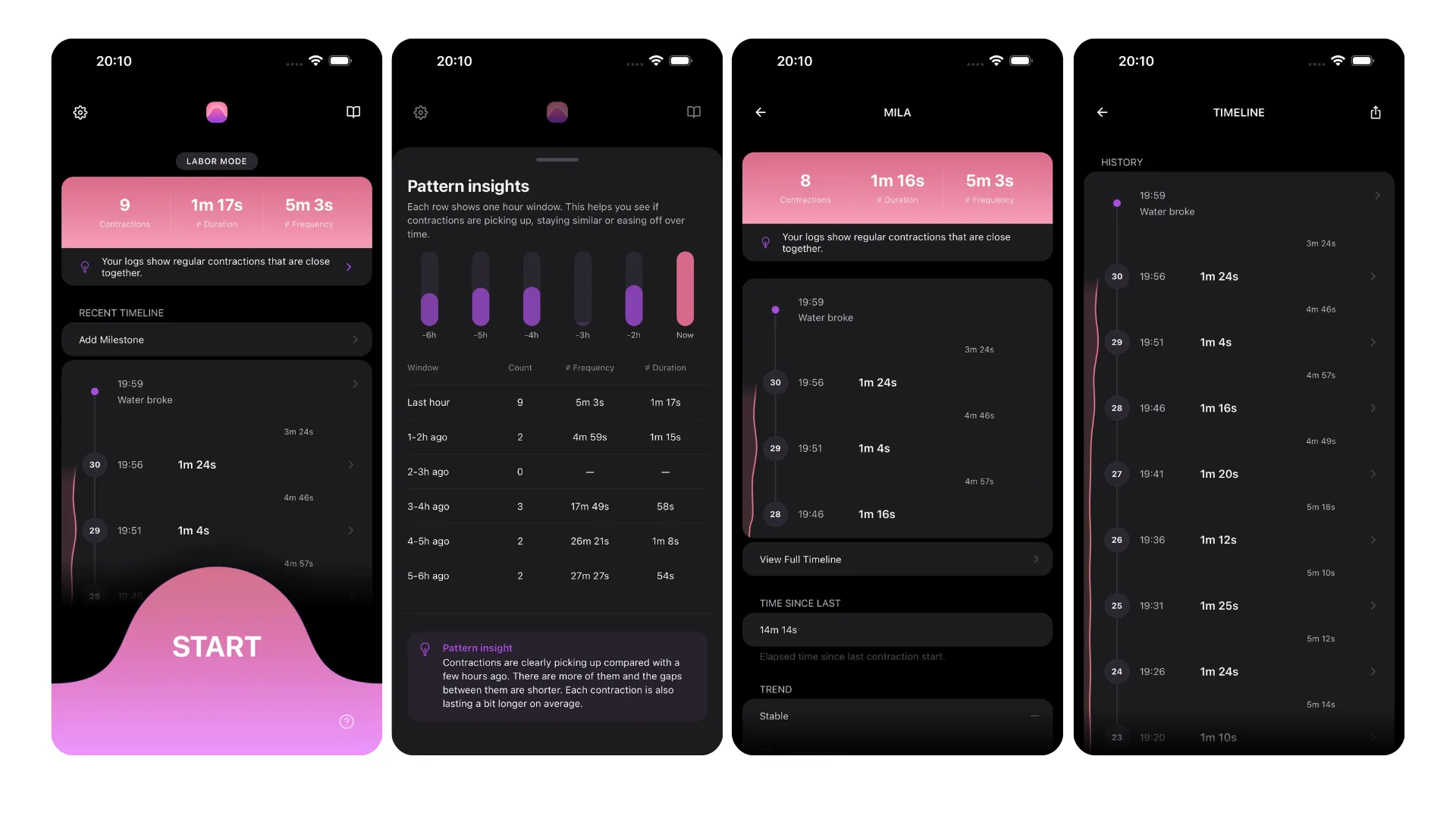
Contraction Timer IO vs Bump Pulse
Contraction Timer IO and Bump Pulse both record contractions, share updates with a partner, preserve history, and work without an account. The main differences are device access, browser timing, lock-screen support, and how clearly each option fits your labor setup.
Contraction Timer IO vs Bump Pulse at a glance
Contraction Timer IO is the stronger fit if you want to time from an iPhone, iPad, Apple Watch, Android device, or web browser. Bump Pulse is a strong dedicated alternative when live partner sharing, Apple Watch and Lock Screen controls, editable history, and an ad-free core experience matter most.
Both support partner sharing and exports without requiring an account. That makes either suitable when a pregnant person wants a birth partner to follow contractions from another phone rather than repeatedly asking for timing updates.
The deciding question is where you expect to tap during labor. Choose around the devices you will actually have nearby, not the longest feature list. Watch and lock-screen access can reduce phone handling, while a browser timer can help when a partner is already working from a laptop or shared computer.
Feature comparison for labor timing
| Feature | Contraction Timer IO | Bump Pulse |
|---|---|---|
| Platforms | iPhone, iPad, Apple Watch, Android, and web (official site) | iPhone, iPad, Apple Watch, and Android (official site; App Store listing, Sep 2026) |
| Browser timer | Supported (official site) | A browser-based timer is not documented in the supplied research |
| Apple Watch | Supported (official site) | Native app with start/stop controls, quick statistics, and recent contractions (App Store listing, Sep 2026) |
| Lock Screen and quick access | Lock Screen access supported (official site) | Lock Screen start/stop, Live Activity, Siri, App Shortcuts, and home-screen widgets (App Store listing, Sep 2026) |
| Partner sharing | Supported (official site) | Live sharing with a partner, doula, or midwife; free partner access is view-only, while full control is available through the paid Birth Certificate Mode option (official site) |
| History export | Supported (official site) | Supported (official site) |
| 5-1-1 guidance | 5-1-1 alerts (official site) | 5-1-1 trend guidance (official site; App Store listing, Sep 2026) |
| Account required | No (official site) | No; the app also works offline (official site) |
| Ads and subscriptions | Free, ad-free core timer (official site) | Free, with no ads of any kind and no subscriptions; an optional paid Birth Certificate Mode adds full sharing control (official site; App Store listing, Sep 2026) |
| App Store rating | 4.8/5 (App Store listing, Sep 2026) | 4.7/5 from 61 ratings (App Store listing, Sep 2026) |
| Published reach and languages | No sourced download or language total was supplied | 30k+ downloads and 14 languages (official site, Sep 2026) |
These details reflect supplied platform research for the cross-platform timer (Contraction Timer IO, 2024-2026) and Bump Pulse (Bump Pulse, 2025-2026). Store availability, upgrade terms, and device compatibility can change, so check the current App Store or Google Play listing before labor.
Partner sharing favors simple coordination
Bump Pulse emphasizes live partner synchronization. Its research profile also identifies editable history, which may help if someone starts or stops a contraction late and needs to correct the record afterward (Bump Pulse, 2025-2026).
The cross-platform option also supports partner sharing without an account. Its advantage is that sharing sits beside broader device access, including a browser timer and Apple Watch support. That can be useful when the pregnant person prefers a watch while the partner follows along from a phone or computer.
Partner sharing is a coordination tool, not a medical interpretation service. A shared pattern can make it easier to communicate what has been happening, but it cannot determine whether labor is established or whether you should remain home. Follow the instructions from your obstetrician, midwife, hospital, or birth center when deciding when to call or leave.
Watch, lock-screen, and web access change the workflow
The broadest verified access belongs to the cross-platform choice. It supports iPhone, iPad, Apple Watch, Android, and the web, plus lock-screen use on supported devices (Contraction Timer IO, 2024-2026). This gives households more ways to keep timing if a phone is charging, packed away, or being used for calls.
Bump Pulse is verified for iPhone, iPad, Apple Watch, and Android. Its App Store listing documents a native Watch app with start/stop controls, plus Lock Screen start/stop, Live Activity, Siri, App Shortcuts, and widgets (App Store listing, Sep 2026).
Bump Pulse also has a website, but the supplied competitor research does not identify or verify a browser contraction timer or a specific collection of web tools. Because no sourced tool count is available, do not choose it based on an assumed web toolkit. Open the current site and verify that the particular calculator or labor tool you want is available.
History, exports, accounts, and upgrade limits
Both choices save contraction history and support exporting it. Bump Pulse specifically lists editable history, while the alternative lists full history but the supplied research does not establish that every saved entry can be edited. If corrections matter to you, test the history controls before contractions become intense.
Neither requires an account. That removes a setup step and means a forgotten password should not block basic timing or sharing. It does not, however, establish identical data storage, retention, deletion, or synchronization policies; review each current privacy policy if those details affect your choice.
Both offer a free, ad-free core experience. Bump Pulse has no ads of any kind and no subscriptions; an optional paid Birth Certificate Mode can add full partner control. Contraction Timer IO lists in-app purchases alongside its free core timer (App Store listing and official sites, Sep 2026).
Who should choose each timer
Pick the cross-platform choice if Apple Watch timing, lock-screen controls, iPad access, or a free browser timer is central to your plan. It is also the more flexible option when household members use different devices or when you want a backup method that does not depend on installing another phone app.
Pick Bump Pulse if you want live partner sharing with editable history plus Apple Watch and Lock Screen controls. Its free app has no ads or subscriptions, requires no account, and includes export support and 5-1-1 trend guidance (App Store listing and official site, Sep 2026).
Before deciding, run a short practice session with the pregnant person and birth partner. Confirm that sharing connects, history is understandable, exports open correctly, and the stop control is easy to reach. Also verify any watch or lock-screen feature on the exact device you intend to use.
The practical verdict is device-dependent. The cross-platform timer wins on verified access and labor-friendly entry points, while Bump Pulse is a solid phone-centered choice for live partner sharing and editable records. Neither timer can evaluate labor or replace advice from your maternity care team.
Frequently asked questions
Which contraction timer is better for partner sharing?
Both support partner sharing. Bump Pulse specifically documents live, view-only access for a partner, doula, or midwife, with full control available through its paid Birth Certificate Mode option. Contraction Timer IO combines partner sharing with iPhone, iPad, Apple Watch, Android, web, Lock Screen access, export, and 5-1-1 alerts. The better choice depends on whether Bump Pulse’s explicitly documented live viewing or Contraction Timer IO’s web access is more important (official sites, Sep 2026).
Can my partner see contractions live from another phone?
Bump Pulse explicitly supports live sharing from another device, with free partner access limited to viewing rather than editing. Contraction Timer IO also supports partner sharing, although the supplied research does not further characterize its sharing latency or editing permissions. Neither app requires an account (official sites, Sep 2026).
Does Bump Pulse work on Apple Watch?
Yes. Bump Pulse has a native Apple Watch app with contraction start/stop controls, quick statistics, and a list of recent contractions. Contraction Timer IO also supports Apple Watch (Bump Pulse App Store listing, Sep 2026; official sites).
Which option has a web contraction timer?
Contraction Timer IO has a verified browser-based contraction timer in addition to its iPhone, iPad, Apple Watch, and Android apps. Bump Pulse has an official website, but a browser-based timer is not documented in the supplied research (official sites, Sep 2026).
Do either of these contraction timers require an account?
No. Contraction Timer IO and Bump Pulse both support use without creating an account. Bump Pulse also explicitly documents offline operation (official sites, Sep 2026).
Can I export contraction history from both apps?
Yes. History export is supported by both Contraction Timer IO and Bump Pulse according to the supplied research. If the exported format matters for a birth partner or care team, test it before labor (official sites, Sep 2026).
Are both contraction timers free and ad-free?
Contraction Timer IO offers a free, ad-free core timer. Bump Pulse is free, has no ads of any kind, and has no subscriptions. Bump Pulse does offer an optional paid Birth Certificate Mode that can add full partner control; free live partner access is view-only (official sites and App Store listing, Sep 2026).
Both apps support iPhone, iPad, Apple Watch, Android, partner sharing, history export, account-free use, and 5-1-1 guidance. Contraction Timer IO additionally provides a web timer and retains an ad-free core experience. Bump Pulse documents a native Apple Watch app, Lock Screen start/stop, Live Activity, Siri, App Shortcuts, widgets, offline use, and live view-only partner sharing. Bump Pulse has no ads of any kind or subscriptions; its optional paid Birth Certificate Mode can give a partner full control. Sources: Contraction Timer IO official site, Bump Pulse official site, and Bump Pulse App Store listing (Sep 2026).
| Published detail | Contraction Timer IO | Bump Pulse |
|---|---|---|
| App Store rating | 4.8/5 (App Store listing, Sep 2026) | 4.7/5 from 61 ratings (App Store listing, Sep 2026) |
| Labor guidance | 5-1-1 alerts (official site) | 5-1-1 trend guidance (official site; App Store listing, Sep 2026) |
| Published reach | No sourced total was supplied | 30k+ downloads and 14 languages (official site, Sep 2026) |