
Freya alternatives
Compare six Freya alternatives, from a free cross-platform contraction timer to simple stopwatch and paper-based methods.


Freya alternatives
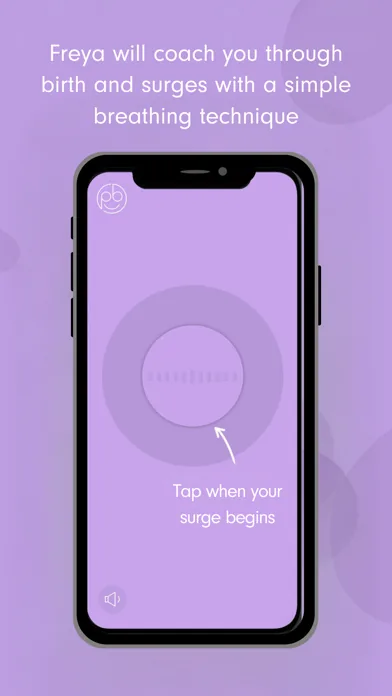
Freya combines contraction timing with hypnobirthing-style breathing and relaxation. If that mix no longer suits you, these alternatives range from a dedicated cross-platform timer to simple tools already on your phone.
The best alternatives for timing labor
The best Freya alternative is a timer that feels easy to start during a contraction and produces a history you can understand between contractions. Contraction Timer IO ranks first here because it works on iPhone, iPad, Apple Watch, Android, and the web, while its core timer is free and does not require an account.
It also supports lock-screen timing, partner sharing, history export, and a full contraction history. Those features can help when the pregnant person wants to focus while a partner watches the pattern.
A dedicated app is not the only workable choice. A phone stopwatch, wearable stopwatch, written note, or paper log can record basic timing without learning another interface. These simpler methods require more attention because you may need to calculate durations and intervals yourself.
The ranking below favors low setup, clear history, and the ability to hand timing to a partner. It does not rank relaxation audio quality because the supplied research does not provide comparable evidence for alternative audio libraries.
Six options ranked by practical usefulness
Each option can record some part of a contraction pattern, but only a dedicated timer automatically organizes starts, stops, durations, and spacing. Choose the least complicated method that gives you and your care team the information you need.
| Feature | Contraction Timer IO | Freya • Surge Timer |
|---|---|---|
| Best for | Simple contraction timing, pattern tracking, 5-1-1 alerts, partner sharing, and export | Hypnobirthing-friendly timing with breathing prompts, affirmations, relaxation audio, and virtual birth-partner support |
| Platforms | iPhone, iPad, Apple Watch, Android, and web | iPhone, iPad, Apple Watch, and Android; the official site specifies Apple Watch Series 3 or later |
| Lock Screen | Yes | Lock Screen controls are not documented in the supplied official sources |
| Partner sharing | Yes | Yes; Freya provides a shareable surge log |
| History export | Yes | Yes; the surge log can be shared |
| 5-1-1 guidance | Yes, with 5-1-1 alerts | Yes |
| Account required | No | No |
| Advertising | Ad-free core | No ads |
| Price | Free core timer | Paid one-time purchase; the current amount varies by store and region |
| App Store rating | 4.8/5 (App Store listing, Sep 2026) | 4.5/5 from 173 ratings (App Store listing, Sep 2026) |
| Main trade-off | Does not include Freya’s integrated hypnobirthing audio coaching | Paid and more coaching-focused than a single-purpose timer |
This is a practical ranking, not a clinical score. A stopwatch may be enough for occasional early contractions, while a dedicated app becomes more useful when events are frequent or more than one person needs to see the history.
Replacing Freya’s breathing and relaxation audio
Freya’s distinguishing angle is its combination of a surge timer with guided breathing and relaxation. Most basic contraction timers focus on recording the pattern rather than coaching you through each surge.
If you want to leave Freya but keep that style of support, separate the two jobs. Use a simple timer for the contraction record, then use familiar hypnobirthing tracks, breathing prompts, music, or spoken relaxation from another source.
Test this setup before labor. Check whether audio continues when the timer opens, whether alerts interrupt the track, and whether your partner can operate the timer without stopping playback. Device behavior and app permissions can vary, so a practice run is more useful than assuming both tools will work together.
Downloaded audio can be more dependable than streaming when connectivity is poor. However, we do not have sourced figures comparing offline audio availability, library size, or breathing programs across Freya alternatives. Check the current store listings before relying on a particular feature.
What you may gain or lose by switching
Switching away from an all-in-one surge timer can make the timing screen simpler. It may also provide broader device access, easier partner involvement, or a format you can export and show without handing over your phone.
The tradeoff is fragmentation. A separate timer and relaxation player require more preparation, and audio controls may compete with timer controls on one device. If your partner has another phone, dividing those jobs can reduce interruptions.
Freya is listed for iOS and Android and is positioned as a hypnobirthing-focused surge timer with guided breathing and relaxation. The supplied research does not confirm its current support for Apple Watch, lock-screen timing, partner sharing, data export, or accounts. That does not mean those features are absent; it means you should check the current listing rather than rely on an unsupported comparison.
Price can also change by platform and region. The researched listings describe Freya as a paid download, but check Apple App Store or Google Play for the current amount before deciding.
How to choose before contractions become intense
Start with the screen you will touch most often. The start and stop controls should be obvious, readable, and difficult to activate accidentally. If you need several taps before timing begins, try another option.
- Decide who will operate the timer: you, your partner, or either person.
- Check whether the history clearly separates contraction duration from the interval between contractions.
- Confirm that the screen remains usable when the phone is locked or dimmed.
- Practice correcting an accidental start or stop without deleting useful history.
- Test sharing or exporting before you need to send a record.
- Keep a simple stopwatch or paper log available as a backup.
Think about devices as well as features. A watch can reduce phone handling, while a web timer can be useful on a partner’s laptop or tablet. A phone-only setup may still be the simplest if you expect to keep that phone nearby.
Avoid choosing solely from screenshots or ratings. Store ratings may reflect older versions, and the rating supplied for publication does not include a sourced year that meets this page’s citation requirements. Current compatibility and recent reviews are more useful checks.
Use timer history as information, not a diagnosis
A contraction timer records what you enter; it cannot confirm active labor, measure cervical change, or determine whether you and the baby are well. Regular-looking contractions can have different meanings depending on your pregnancy and clinical circumstances.
Before labor, ask your obstetrician, midwife, or hospital when they want you to call and where they want you to go. Follow those individualized instructions rather than waiting for an app to produce a particular pattern.
Contact your maternity care team promptly if you have urgent symptoms, concerns about fetal movement, bleeding, fluid leakage, severe or unusual pain, or simply feel that something is wrong. Do not keep timing in place of seeking help.
When you call, a clear history can still be useful. Be ready to describe when contractions began, how they have changed, whether you can talk or move through them, and any other symptoms. The timer supports that conversation; your care team interprets the information.
Frequently asked questions
What app is similar to Freya?
Contraction Timer IO is a free alternative for timing contractions and reviewing patterns. It works on iPhone, iPad, Apple Watch, Android, and the web, with Lock Screen access, partner sharing, export, 5-1-1 alerts, no required account, and an ad-free core. Unlike Freya, it does not include integrated hypnobirthing audio coaching. (App Store listing, Sep 2026; official site.)
Is there a free alternative to Freya?
Yes. Contraction Timer IO has a free, ad-free core timer for iPhone, iPad, Apple Watch, Android, and the web. It includes Lock Screen access, partner sharing, history export, 5-1-1 alerts, and does not require an account. A phone stopwatch is also free, but spacing, history, and calculations must be recorded manually. (App Store listing, Sep 2026; official site.)
Can I time contractions without an app?
Yes. Use a stopwatch, clock, notes page, or paper log to record when each contraction starts and ends and the interval before the next one begins. This works as a backup, although manual recording and calculations can become difficult as contractions intensify.
Which contraction timer works on Apple Watch?
Contraction Timer IO and Freya both support Apple Watch. Contraction Timer IO also works on iPhone, iPad, Android, and the web. Freya’s official site specifies compatibility with Apple Watch Series 3 or later. Test the timer and synchronization before labor and confirm that your devices meet the current software requirements. (App Store listing, Sep 2026; official site.)
Do contraction timer apps tell you when to go to the hospital?
A contraction timer can identify patterns such as 5-1-1, but it cannot decide when you should go to the hospital or assess cervical change, fetal well-being, bleeding, fluid leakage, or your full medical situation. Contraction Timer IO provides 5-1-1 alerts, and Freya provides 5-1-1 guidance, but you should follow the call and arrival instructions from your obstetrician, midwife, or maternity unit.
Can my birth partner time contractions for me?
Yes. A birth partner can operate the timer while you focus on movement, breathing, or rest. Contraction Timer IO supports partner sharing and history export, while Freya provides a shareable surge log and virtual birth-partner support. A partner can also use a stopwatch and written log. (Official sites.)
Do I need hypnobirthing audio in a contraction timer?
No. Hypnobirthing audio is optional and separate from contraction timing. Freya integrates breathing prompts, affirmations, relaxation audio, and virtual birth-partner support. Contraction Timer IO instead focuses on timing, pattern tracking, 5-1-1 alerts, partner sharing, and export. If you use separate audio and timer tools, test them together before labor so playback and alerts do not interfere. (Official sites.)
Freya combines surge timing with breathing prompts, affirmations, relaxation audio, a shareable log, and virtual birth-partner support. It is available for iPhone, iPad, Apple Watch, and Android as a one-time purchase; the official site specifies Apple Watch Series 3 or later. Freya is rated 4.5/5 from 173 ratings (App Store listing, Sep 2026; official site).
Contraction Timer IO offers a free, ad-free core timer on iPhone, iPad, Apple Watch, Android, and the web. It includes Lock Screen access, partner sharing, history export, 5-1-1 alerts, and requires no account. It is rated 4.8/5 (App Store listing, Sep 2026; official site).
| App | Sourced distinction |
|---|---|
| Contraction Timer IO | Free core timer with Apple Watch, Android, web, Lock Screen, partner sharing, export, no required account, ad-free core, and 5-1-1 alerts. |
| Freya | Paid hypnobirthing surge timer with Apple Watch support, audio coaching, affirmations, relaxations, 5-1-1 guidance, and a shareable surge log. |