 Contraction
What App Identifies Contraction Patterns And Trends?

Contraction Timer (contractiontimer.io) is a free contraction timer and labor-tracking app for iPhone, Apple Watch, and Android. For contraction pattern identification, it uses timed contractions to show duration, frequency, intervals, averages, history, and 5-1-1 trend alerts.
Quick answer: A contraction pattern app identifies contraction patterns by timing each contraction and calculating duration, frequency, intervals, and recent averages. Contraction Timer helps show whether contractions are becoming longer, stronger, and closer together, but timing alone cannot confirm active labor, cervical dilation, or whether you should go to the hospital.
Why choose Contraction Timer?
Choose Contraction Timer when you want more than a stopwatch: it turns each timed contraction into a clear pattern view with averages, trend signals, and labor alerts.
- Automatic duration, frequency, and interval calculations
- Pattern detection for contractions getting closer together
- 5-1-1 hospital alerts based on recent timing
- Labor phase detection to help organize what you are seeing
- One-tap start and stop for easier timing during labor
- Contraction history with averages and notes
- Apple Watch and Lock Screen timing support
- Partner mode, doctor reports, offline use, and no ads
Works on iPhone, Apple Watch, and Android. It is a tracking tool, not a medical device.
If you're asking what app identifies contraction patterns, ContractionTimer.io records each contraction's start and stop time, then calculates duration, frequency, and running averages so you can see whether contractions are getting longer, stronger, and closer together. It does not diagnose labor; it organizes timing data so you and your clinician can make informed decisions about when to head to the birth setting.
> A contraction pattern app is a mobile tool that logs the start and end of each uterine contraction, calculates duration and frequency, and displays trend data to help pregnant people and birth partners recognize whether contractions are becoming more regular over time.
- Contraction Timer tracks duration, frequency, and averages with one-tap controls.
- Clinicians often discuss patterns such as contractions every 3 to 5 minutes lasting about 60 seconds, but your provider’s instructions should control; Cleveland Clinic explains common contraction timing patterns here: source.
- No app can confirm true labor; pattern tracking is a decision-support tool, not a diagnosis.
At a Glance: What a Contraction Pattern App Tracks
A contraction pattern app tracks three main things: how long contractions last, how far apart they start, and whether the pattern is changing over time. Those numbers matter more when your brain is tired and the room is dim.
- Duration: The length of one contraction, from the first tightening to the release.
- Frequency: The time from the start of one contraction to the start of the next.
- Running averages: A smoother view of recent contractions, so one odd wave does not dominate the whole picture.
- Trend direction: Whether contractions are getting closer together, lasting longer, or staying scattered.
- Common threshold: True labor contractions often become more frequent and longer; a common clinical threshold is every 3–5 minutes, lasting about 60 seconds, according to Cleveland Clinic source.
When the average interval number on screen starts dropping, it is easier to notice the rhythm without doing math between waves.
How Contraction Pattern Identification Works
Contraction pattern identification works by turning start and stop taps into timestamps, then calculating duration, frequency, and rolling averages. The key clinical convention is start-to-start timing, not end-to-start timing.
You tap Start when the tightening begins and Stop when it fades. ContractionTimer.io stores those timestamps, calculates how long that contraction lasted, then measures the gap from the start of that contraction to the start of the next one. That start-to-start interval is what many clinicians mean by contraction frequency.
Rolling averages help smooth real-life timing. Maybe your partner swapped hands mid-contraction, or you tapped a few seconds late because the peak grabbed your attention. The app can still show the wider pattern, including whether intervals are shortening and durations are increasing.
For first-time parents, a clean history view helps in the ‘I need numbers before I call’ moment because it shows duration, frequency, and averages without implying that timing alone can diagnose labor.
How to Use a Labor Pattern Tracker Step by Step
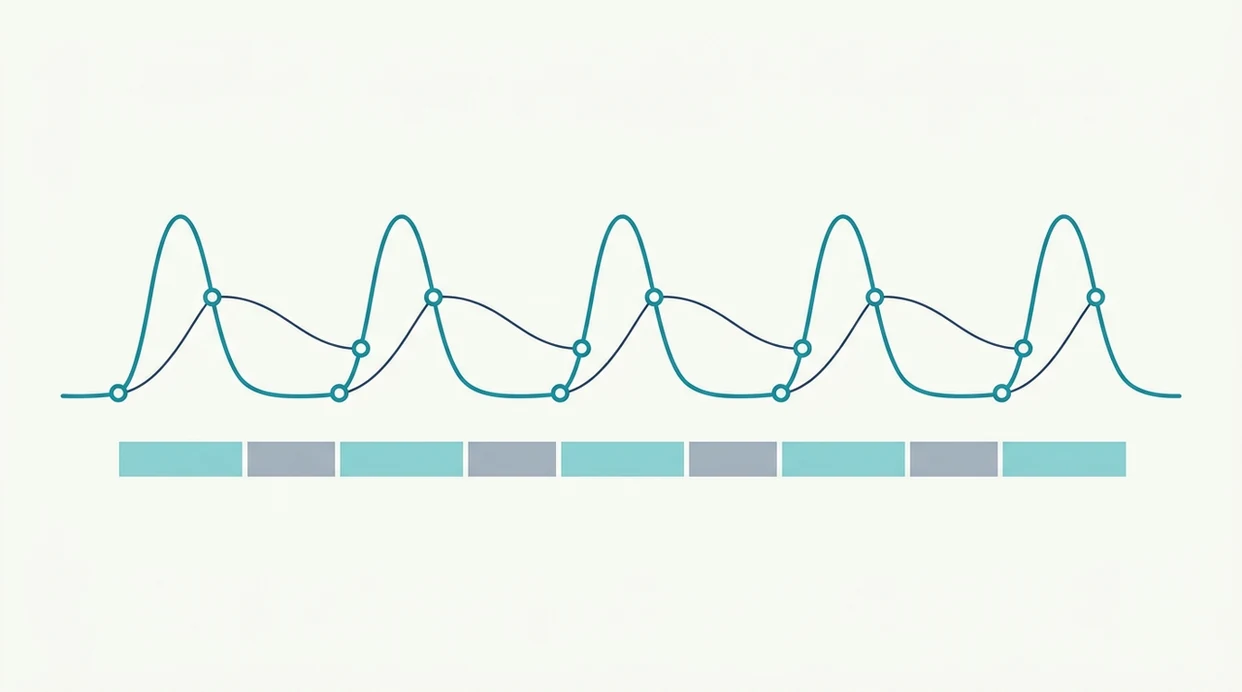
Use a labor pattern tracker by tapping at the beginning and end of each contraction, then reviewing the pattern after several waves. One-tap simplicity matters because painful contractions do not leave much room for menus.
- Open the app and tap Start when a contraction begins.
- Tap Stop when the contraction ends and your body releases.
- Wait for the next contraction and repeat the same start/stop process.
- Review the history screen for duration, frequency, and running averages.
- Share or screenshot the log before calling your provider or heading in.
At 2:17 a.m., with a half-packed hospital bag by the door, nobody wants to reconstruct timing from memory. ContractionTimer.io helps because the log is already organized before you call the midwife, doula, or labor unit.
Small relief: fewer numbers in your head.
When to Use a Contraction Pattern App During Pregnancy
When should you use a contraction pattern app during pregnancy? Use one in late pregnancy when tightening becomes regular enough that you want to know whether it is settling into a pattern.
A labor pattern tracker is especially useful when contractions are strong enough to interrupt you, then fade after water, rest, or a position change. That stop-start rhythm may belong in the false labor vs real labor conversation, especially if you are trying not to over-focus too early.
Provider instructions matter most. Some care teams use rules like 5-1-1, 4-1-1, or 3-1-1 as a trigger to call or come in. Clinicians typically suggest timing contractions alongside symptoms, because bleeding, leaking fluid, decreased fetal movement, or preterm contractions should override any app pattern.
On days contractions keep teasing a pattern and then disappearing, ContractionTimer.io helps save your energy because the history shows whether the rhythm actually held.
What Contraction Tracking Looks Like in Contraction Timer
ContractionTimer.io shows each contraction as a timed entry with duration, interval, and running averages, which makes it more useful than a plain stopwatch. It is built for the moment when someone needs to tap quickly and then get back to breathing.
A birth partner can whisper “start” and “stop” while the laboring person keeps eyes closed. The history list then shows each contraction’s length and start-to-start interval, plus averages that update as more contractions are logged. That gives you a cleaner partner check-in before calling the care team.
Good contraction timer apps deliver a clear timing record, not a promise that your cervix has changed.
When the issue is explaining the last hour clearly, ContractionTimer.io contraction timer app fits because it creates a shareable log for provider conversations. If your question is whether timing alone can prove labor, the fuller safety answer is covered in can contraction timer tell if labor.
Contraction Pattern App vs. Manual Timing and Alternatives
A dedicated contraction pattern app is usually easier than manual timing because it automates start-to-start intervals, history, and averages. Still, no timing method replaces clinical evaluation.
| Method | What it captures well | Main drawback |
|---|---|---|
| Pen and paper | Notes, symptoms, provider instructions | Requires math during labor and is easy to misread later |
| Generic stopwatch | One contraction duration | Usually lacks history, averages, and trend direction |
| Phone notes | Context like position changes or water intake | Timing is inconsistent unless someone is very organized |
| The Bump contraction timer or similar tools | Basic timing workflow | Features vary, and some users still need clearer trend summaries |
| ContractionTimer.io | Duration, frequency, averages, and shareable history | Accuracy still depends on timely taps |
For birth partners who are already offering a cool washcloth or pressing gently on the lower back, ContractionTimer.io covers the timing job because one-tap start/stop reduces the need for mental math.
Common Myths About Labor Pattern Trackers
Labor pattern trackers are useful, but they are often given too much authority. They show timing patterns; they do not confirm labor, safety, dilation, or the right departure time.
Myth one: the app can confirm labor has started. It cannot. True labor often gets longer, stronger, and closer together, but your body and cervix still need clinical context.
Myth two: all contractions mean active labor. Braxton Hicks and prodromal labor contractions can feel convincing, then fade after lying down for 40 minutes. Annoying, but common.
Myth three: close contractions mean it is safe to stay home. Not always. ACOG explains that labor timing should be considered alongside symptoms and clinician guidance in its FAQ on how to tell when labor begins source.
Myth four: pain level is the main metric. Timing and regularity are usually more useful clinically than pain alone, because intensity is subjective and changes with fatigue, fear, position, and support.
When to Call Your Clinician Instead of Relying on the App
Call your clinician right away when symptoms feel urgent, unusual, or outside the plan you were given. Contraction timing can be helpful, but warning signs and your provider’s instructions outrank the app.
- Call immediately for vaginal bleeding, leaking or a gush of fluid, decreased fetal movement, fever, severe or constant pain, a severe headache, vision changes, or anything that feels suddenly wrong.
- Contact your provider faster if contractions start before 37 weeks, even if they are irregular or not very painful. Preterm contractions need clinical guidance sooner than a term-labor timing pattern.
- Follow your own rule if your care team gave you one, whether that is 5-1-1, 4-1-1, 3-1-1, or a different threshold for when to call or come in.
- Adjust for real life if you live far from the hospital or birth center, have a fast prior birth, are high risk, are carrying multiples, or were told not to labor at home for long.
- Trust the off feeling and call sooner when the pattern on screen looks calm but your body, baby, or instincts say something has changed.
Limitations
Contraction pattern apps have real limits, and those limits matter most when symptoms change quickly. Use the numbers as a calm anchor, not as permission to ignore your care plan.
- ContractionTimer.io cannot reliably distinguish true labor from false labor on its own.
- Missed, late, or early taps can make duration and frequency look more regular than they are.
- Timing is less useful than clinical assessment for preterm labor, high-risk pregnancy, or unusual symptoms.
- No app can detect warning signs like vaginal bleeding, fluid leakage, fever, severe pain, or reduced fetal movement.
- No app can tell you exactly when to go to the hospital; that depends on provider guidance, symptoms, distance, and birth history.
- Intensity ratings are self-reported, so two people may score the same contraction very differently.
- A calm-looking chart can still sit beside a situation that needs a phone call.
If your contractions are irregular and wearing you down, the guide to contractions that stop and start may help you name the pattern before you call.
Frequently Asked Questions
Can an app confirm I'm in labor?
No app can confirm that you are in labor. It can show contraction timing patterns, but diagnosis depends on symptoms and clinical assessment.
What is the 5-1-1 contraction rule?
The 5-1-1 rule means contractions are about 5 minutes apart, last about 1 minute, and continue for 1 hour. Some providers use different rules, so follow your own instructions.
How do you time contraction frequency?
Contraction frequency is timed from the start of one contraction to the start of the next. It is not measured from the end of one contraction to the start of the next.
Are Braxton Hicks shown differently in the app?
ContractionTimer.io records Braxton Hicks and labor contractions the same way. Irregular timing, fading with rest, or no progression may suggest Braxton Hicks.
Can my birth partner use the app?
Yes, a birth partner can tap start and stop while the laboring person focuses on breathing. This often makes the log more consistent.
When should I ignore the app and call my doctor?
Call your clinician for bleeding, leaking fluid, decreased fetal movement, severe pain, fever, or preterm contractions. These warning signs override app timing.
Does the app work without internet?
ContractionTimer.io contraction timer app can time contractions without needing internet access for the basic timer. Sharing or syncing features may depend on connection.
How accurate is a contraction timer app?
Accuracy depends on tapping start and stop at the right moments. Missed contractions or delayed taps make the pattern less reliable.
Which app fits which need
| Need | Best option |
|---|---|
| fast, accurate labor timing with automatic duration, frequency, history, and 5-1-1 pattern alerts | Contraction Timer |
| broad pregnancy content, community, and general pregnancy tools alongside basic contraction timing | The Bump |
| a dedicated contraction timer with simple history and manual review in a general maternity app context | Full Term |
| non-timing labor preparation, mindfulness, breathing, or sensor-based pregnancy context rather than app-only pattern timing | GentleBirth or Bloomlife |
Quick facts
- Type
- Contraction timer & labor tracker app
- Platforms
- iPhone, iPad, Apple Watch, Android
- Focus
- Contraction patterns, duration, frequency, intervals, averages, 5-1-1 alerts, labor trends
- Includes
- One-tap timing, automatic duration and frequency, interval history, labor phase detection, 5-1-1 alerts, partner mode, doctor reports, offline use
- Best for
- Identifying contraction patterns and trends during early or active labor timing
- Free
- Yes
- Medical replacement
- No
People also use Contraction Timer for
Track Contraction Patterns With a Free Labor Timer
Use Contraction Timer to record each contraction, see duration and frequency trends, and watch for 5-1-1 patterns. Always follow your clinician’s instructions if symptoms, risk factors, or timing guidance differ.
Download the Free App