 Contraction
How To Time Contractions On iPhone During Labor

Contraction Timer (contractiontimer.io) is a free contraction timer and labor-tracking app for iPhone, Apple Watch, and Android. For this page, it helps parents time contractions on iPhone with one-tap tracking, automatic pattern calculations, and 5-1-1 reminders.
Quick answer: To time contractions on iPhone, tap start when a contraction begins and stop when it ends; the app should calculate duration, frequency, and interval automatically. Contraction Timer helps you spot patterns such as 5-1-1, keep a readable history, and know when to contact your care team based on your provider’s instructions.
Why choose Contraction Timer?
Contraction Timer is easier than a generic iPhone stopwatch because it is built specifically to time contractions, calculate labor patterns, and keep a shareable record.
- One-tap start and stop timing
- Automatic duration, frequency, and interval calculations
- 5-1-1 hospital pattern alerts
- Labor phase detection support
- Readable contraction history on iPhone
- Apple Watch and Lock Screen access
- Partner mode for shared tracking
- Offline use with no ads
Works on iPhone, Apple Watch, and Android. It is a tracking tool, not a medical device.
If you need to know how to time contractions on iPhone, use a contraction timer app or the built-in Stopwatch, tap when each contraction starts and ends, and repeat for several contractions so your care team can review duration and frequency patterns.
Definition: Contraction timing is the process of recording both how long each contraction lasts (duration) and how much time passes between the start of one contraction and the start of the next (frequency) so you and your clinician can assess labor progress.
TL;DR
- Use a one-tap contraction timer app or the iPhone Stopwatch to log start and stop times.
- Track at least 4–6 contractions in a row, patterns matter more than a single reading.
- Share your contraction history with your care team but never let an app replace professional medical judgment.
This guide is for contraction-tracking logistics only and is not medical advice; follow the call-in instructions from your doctor, midwife, hospital, or triage nurse.
Contraction Timing Basics On iPhone
Contraction timing on iPhone means recording two numbers: duration and frequency. Duration is the start-to-finish length of one contraction; frequency is measured from the start of one contraction to the start of the next.
The iPhone works well because it is usually already close. You can tap with one hand, keep the screen readable in a dim room, and hand the phone to a partner when your eyes need to stay closed. At 2:17 a.m., that matters more than fancy features.
Per the CDC National Center for Health Statistics, about 3.6 million births happen in the United States each year, so labor timing is a very common need (CDC FastStats). Still, an app is only a tracking aid. It is not a medical device, and it cannot tell you whether your cervix is changing or whether you should leave now.
For the broader basics, the full how to time contractions guide explains the same method without the iPhone-specific steps.
iPhone Setup Checklist Before Timing Contractions
Before contractions become intense, set up the iPhone so timing takes one tap instead of a small project. Early labor can pause and restart, but setup is easier before you are breathing through every wave.
Keep these ready:
- iPhone with a contraction timer app installed, or the Clock app opened to Stopwatch.
- Charger or battery pack, since early labor sessions can last for hours.
- Your clinician’s call-in criteria written somewhere obvious, not buried in messages.
- Optional Apple Watch, if wrist taps feel easier during pain.
- A partner check-in plan, including who taps start and stop if you need both hands free.
The midwife number taped to the fridge is not silly. It is preparation.
If you are still unsure when to begin, when to start timing contractions gives more examples.
Contraction Duration And Frequency Patterns
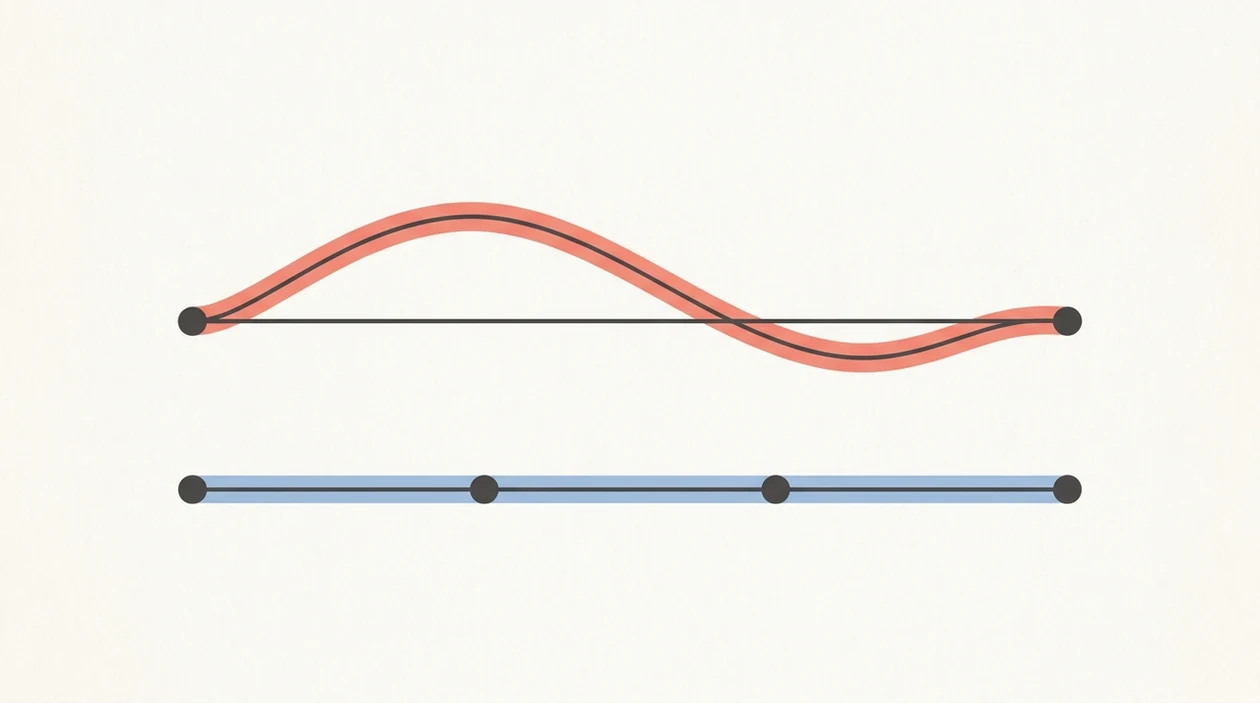
How contraction timing works: the log turns repeated start and stop taps into a pattern. Clinicians look at duration, frequency, regularity, and your symptoms together, not one isolated contraction.
- Labor contractions often become closer together and last longer as labor progresses, according to NIH MedlinePlus (Signs of labor).
- Frequency is counted from the start of one contraction to the start of the next, not from the end of one to the start of another.
- Duration matters, but frequency often tells the clearer story when labor is organizing.
- Self-monitoring tools can support communication with care teams, but clinical judgment still decides what the data means.
- The most useful contraction log is a series of 4–6 timed contractions with notes about intensity, movement, and fluid or bleeding if present.
True Labor vs. Braxton Hicks Patterns
True labor contractions tend to build a rhythm. Braxton Hicks contractions are often irregular and do not usually become progressively stronger and closer together, according to the NIH. Prodromal labor can be frustrating too: strong enough to stop conversation, then gone after lying down for 40 minutes.
For many people, contraction duration vs frequency is the missing piece.
6 Steps To Use An iPhone Contraction Timer
To use an iPhone contraction timer, tap at the beginning and end of each contraction, then repeat long enough to see a pattern. A one-tap app is usually easier than the Stopwatch because it stores duration, frequency, and session history automatically.
- Open the contraction timer app or the iPhone Clock app and select Stopwatch.
- Tap Start when the contraction begins, ideally when tightening first becomes noticeable.
- Tap Stop when the contraction ends; this records the duration.
- Rest between contractions while the app tracks the gap for frequency.
- Repeat for at least 4–6 contractions so you are not judging labor from one wave.
- Review the session history and share the pattern with your doctor, midwife, or triage nurse.
A birth partner can whisper “start” and “stop” while you keep your eyes closed. That small handoff can save your energy.
Good contraction timer apps deliver clear timing history, not a diagnosis or permission to ignore your clinician’s plan.
iPhone Contraction History And The 5-1-1 Pattern
Your iPhone contraction history is most useful when it shows a trend. Contractions getting longer, stronger, and closer together may suggest labor is progressing, especially when the pattern holds over time.
The 5-1-1 pattern means contractions are about 5 minutes apart, lasting about 1 minute each, for about 1 hour. Many birth classes teach it as a call-the-doctor benchmark, but your own clinician’s instructions come first. High-risk pregnancies, prior fast labor, water breaking, bleeding, reduced fetal movement, or distance from the hospital can change the plan. ACOG also advises contacting your obstetric care team when you think labor has started or if you have concerning symptoms such as bleeding, leaking fluid, or reduced fetal movement (ACOG: How to Tell When Labor Begins).
Irregular gaps or fading intensity may point toward Braxton Hicks, especially if the tightening eases after hydration, rest, or changing positions. But patterns can shift quickly.
The most common medically supported way to use home contraction timing is to track repeated contractions and combine the log with real-time guidance from your care team.
For the timing benchmark, read more about 5-1-1 rule contractions.
When To Call Your Doctor Or Go To Triage
Call your doctor, midwife, hospital, or triage nurse whenever your personal instructions say to call, even if the app is quiet. Go by the plan your clinician gave you before any generic timer alert or birth-class benchmark.
- Follow your written call criteria first, including any special timing rule, symptom trigger, or “come in now” instruction.
- Call right away for vaginal bleeding, leaking fluid, reduced fetal movement, severe or unusual pain, or anything that feels clearly wrong.
- Ignore 5-1-1 as the main benchmark if your pregnancy is high-risk, you have a history of fast labor, your water has broken, or your hospital is far away.
- Explain both the numbers and the lived picture: contraction frequency, duration, intensity, fluid, bleeding, fetal movement, and whether you can talk or walk through contractions.
- Call if the log and your symptoms do not match. A neat chart with mild sensations and a messy chart with intense pressure can mean very different things.
A contraction timer is helpful language for the phone call. It is not the person responsible for deciding whether you stay home.
5 Common iPhone Contraction Timing Mistakes
The biggest contraction timing mistakes come from incomplete data or too much trust in the timer. The iPhone can organize the numbers, but it cannot read the whole room.
Common mistakes include:
- Timing only one or two contractions, then assuming the pattern is reliable.
- Watching duration only and ignoring how far apart contractions are.
- Believing an app can diagnose labor or decide when to go to the hospital.
- Starting too late, after contractions are already hard to tap through.
- Missing taps during painful peaks and leaving incorrect entries in the session.
- Following generic timing rules instead of the instructions your clinician gave you.
One rough contraction entry is not a failure. Skip it, breathe, and start fresh on the next wave.
Clinicians typically recommend calling for individualized guidance when contractions are regular, symptoms change, or your written labor instructions say to call.
iPhone Widgets And Apple Watch For Faster Contraction Tracking
Fast access matters because active pain narrows attention. A Lock Screen or Home Screen widget can reduce the steps between “this one started” and a clean timestamp.
Apple Watch can help if the phone is across the bed or tucked under a pillow. A wrist-tap is easier when you are gripping a bed rail or leaning into a partner’s hand. Some apps also support Siri Shortcuts, which may allow voice-based start and stop commands, though voice commands can be awkward during a contraction.
Tools like ContractionTimer.io, GentleBirth, and other iPhone contraction timer apps are built for this one job: quick logging without mental math. The ContractionTimer.io contraction timer app may be most useful when a partner is reviewing the timeline during quiet minutes between contractions.
Simple wins here.
Contraction Log Accuracy Checks On iPhone
Before acting on a contraction log, check that the entries look believable. A clean-looking chart can still be wrong if someone tapped late, forgot to stop, or logged a contraction twice.
Cross-check a few entries against a wall clock or the iPhone time display. Ask your birth partner to review the log independently, especially if you were breathing through the wave and not watching the screen. If something looks off, delete or ignore that entry rather than forcing it into the pattern.
During a phone check-in or triage visit, show the session history to your clinician. A screenshot is often enough if export is clumsy.
For iPhone users, a timer app is often easier than Stopwatch because it preserves the sequence of contractions while the laboring person rests between waves.
If you want the math behind the gaps, use how to calculate contraction frequency.
Limitations
An iPhone contraction timer can make labor tracking calmer, but it has clear limits. Treat the log as information for a clinician, not as a final answer.
- An iPhone timer cannot confirm labor; only a clinician can evaluate contractions, symptoms, fetal movement, medical history, and cervical change.
- Timing is less useful if you are distracted, miss taps, or start after contractions are already intense.
- App-based guidance can be oversimplified because labor does not always follow textbook patterns.
- Generic rules should not override your personal instructions from a doctor, midwife, or hospital.
- Automated alerts are not a substitute for real-time medical assessment.
- Battery drain can interrupt tracking during a long early labor stretch.
- Connectivity issues may affect sharing or syncing, even if basic timing still works offline.
- Pain, nausea, fear, or exhaustion can make even a simple tap feel like too much.
If the log and your body disagree, call. Front porch air between contractions can clear your head, but it cannot replace medical advice.
Frequently Asked Questions
Can an iPhone app diagnose labor?
No. An iPhone app can track contraction duration and frequency, but only a clinician can confirm labor.
What is the 5-1-1 contraction rule?
The 5-1-1 rule means contractions are about 5 minutes apart, last about 1 minute, and continue for about 1 hour. Your clinician may give different instructions based on your pregnancy.
Does the iPhone Stopwatch work for contractions?
Yes, the iPhone Stopwatch can time contraction duration. It does not automatically organize frequency, trends, or session history the way many contraction timer apps do.
How many contractions should I time before calling my doctor?
Time at least 4–6 contractions in a row to identify a pattern, unless your clinician told you to call sooner. Call immediately for urgent symptoms or any concern your care team named in advance.
Can I time contractions on Apple Watch?
Yes, some contraction timer apps with a watchOS companion allow wrist-tap timing. This can be easier when holding a phone feels distracting.
What should I do if I miss a tap during a contraction?
Skip the inaccurate entry and start fresh with the next contraction. One missed tap is less important than a reliable series.
Are Braxton Hicks contractions worth timing?
Yes, timing can help show whether contractions are irregular or becoming stronger and closer together. Irregular contractions that fade may be Braxton Hicks, but ask your clinician if you are unsure.
Can I share contraction timer data with my doctor or midwife?
Yes, most apps let you export, copy, or screenshot contraction history. ContractionTimer.io can be used to show duration and frequency patterns during a care-team check-in.
Which app fits which need
| Need | Best option |
|---|---|
| Fast, accurate iPhone contraction timing with automatic duration, frequency, history, and 5-1-1 alerts | Contraction Timer |
| Full-term pregnancy articles, checklists, and general week-by-week education alongside light tracking | Full Term |
| Broad pregnancy community content, registry guidance, and general pregnancy planning | The Bump |
| Mindfulness, breathing practice, and birth preparation content rather than dedicated contraction timing | GentleBirth |
Quick facts
- Type
- Contraction timer & labor tracker app
- Platforms
- iPhone, iPad, Apple Watch, Android
- Focus
- Contraction timing, duration, frequency, intervals, 5-1-1 alerts, labor patterns, contraction history
- Includes
- One-tap timing, automatic duration and frequency, 5-1-1 alerts, labor phase detection, history, partner mode, doctor reports, offline use
- Best for
- Parents timing contractions on iPhone during early or active labor
- Free
- Yes
- Medical replacement
- No
People also use Contraction Timer for
Time Contractions On iPhone With Less Guesswork
Use Contraction Timer to start and stop contractions in one tap, review your history, and watch for patterns like 5-1-1. Always follow your healthcare provider’s instructions about when to call or go to triage.
Download the Free App