
Contraction Timer Vs Fetal Monitor: Know The Difference Before Labor


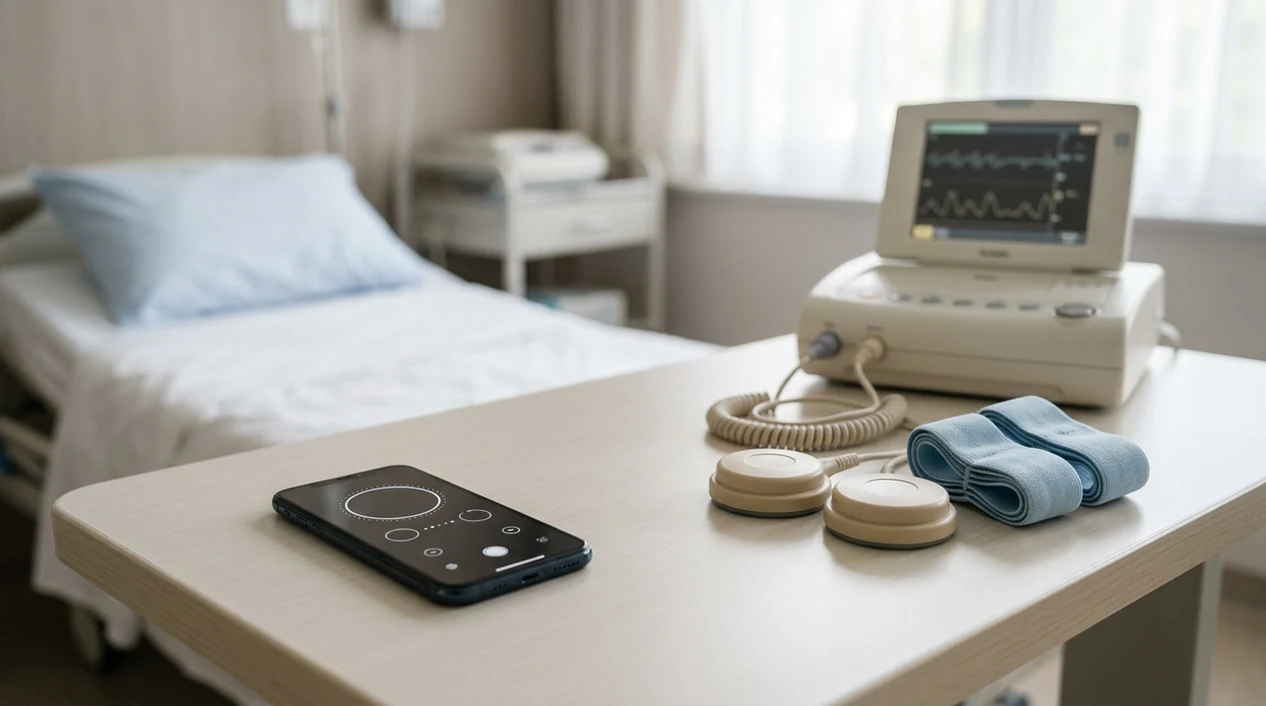

A contraction timer vs fetal monitor comparison comes down to one safety boundary: contraction timer apps track only the duration and frequency of contractions from manual taps, while clinical fetal monitors measure uterine activity and your baby's heart rate in real time. No consumer app can replace electronic fetal monitoring for fetal well-being decisions.
This article is educational and is not medical advice. If you have bleeding, reduced fetal movement, severe pain, fever, ruptured membranes, high blood pressure symptoms, or any concern that something feels wrong, contact your maternity care team or emergency services instead of relying on an app.
Definition: A contraction timer is a consumer app that logs contraction start and stop times from user taps; a fetal monitor is clinical medical equipment that continuously tracks fetal heart rate and uterine contractions using external sensors or internal probes.
TL;DR
- Contraction timer apps measure only timing, duration and spacing, from your taps. They cannot detect fetal heart rate.
- Clinical fetal monitors correlate contraction patterns with the baby's heart rate to identify distress, guiding medical decisions.
- Consumer apps are documentation tools, not diagnostic tools. Always pair app data with professional guidance.
At-a-Glance: Contraction Timer App Vs Clinical Fetal Monitor
A contraction app vs monitor comparison is simple: the app records what you tap, while the monitor records physiologic data from sensors. One helps you explain a pattern; the other helps clinicians assess fetal status.
| Category | Contraction timer app | Clinical fetal monitor |
|---|---|---|
| What it measures | Contraction duration and frequency from Start/Stop taps | Fetal heart rate and uterine activity from sensors |
| Who operates it | Pregnant person or birth partner | Nurses, midwives, physicians, trained staff |
| Where it's used | Home, car, triage waiting area | Hospital, birth center, monitored setting |
| Regulatory status | A timing-only contraction app is generally a consumer documentation tool, not a fetal-monitoring device; products that diagnose, monitor, or treat medical conditions may fall under FDA medical-device oversight Fda guidance | Medical-grade equipment used for clinical assessment |
| Data output | Log, intervals, average spacing, notes | FHR tracing, contraction tracing, variability, decelerations |
| Cost | Usually free or low-cost | Part of medical care billing |
| Role in labor | Self-tracking and provider communication | Diagnosis, surveillance, and decision support |
The most useful home setup is boring: tap Start, tap Stop, review the log. If Face ID fails in a dark room, hand the phone to your partner and keep breathing.
5 Facts About Contraction Timers Vs Fetal Monitors
These five facts are the safety boundary. Save them before labor gets loud.
- A contraction timer app measures only timing from manual taps. It cannot know whether a contraction is strong, productive, or changing the cervix.
- A fetal monitor tracks fetal heart rate response to contractions. No consumer app can measure accelerations, decelerations, or variability.
- Electronic fetal monitoring is common in U.S. labor. ACOG describes it as the most common obstetric procedure, used in about 85 to 90% of labors. In a U.S. cohort study, 90% of more than 50,000 term singleton births underwent EFM during labor published labor research.
- Apps use generic timing rules, such as 5-1-1 or 4-1-1. They do not adjust for your blood pressure, bleeding, fetal movement, induction plan, or prior cesarean.
- High-risk pregnancies require professional monitoring decisions, not consumer tools. Clinicians typically recommend fetal heart rate assessment when symptoms or risk factors change.
A good contraction timer app gives timing records, not fetal reassurance. Tools like ContractionTimer.io can help organize early labor notes, but they should not be treated like clinical fetal monitoring.
How Contraction Timing and Fetal Monitoring Work
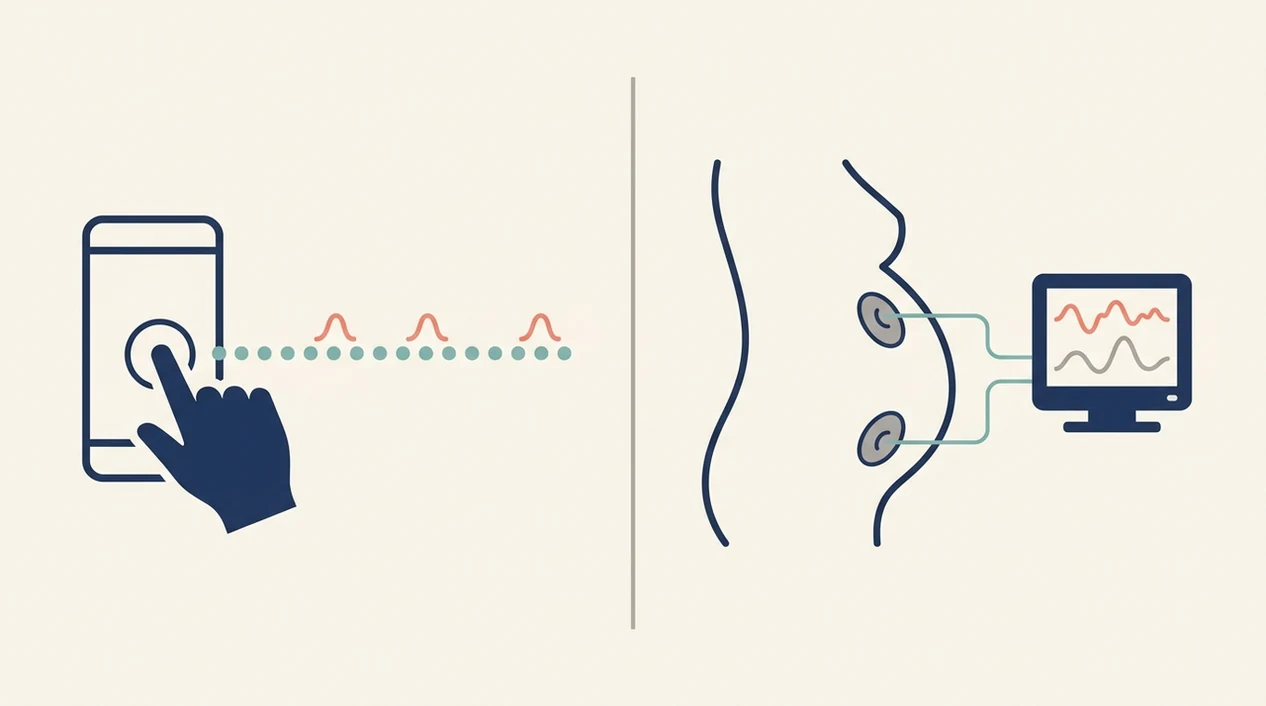
Contraction timing works by converting your taps into intervals. Fetal monitoring works by reading uterine activity and fetal heart rate with clinical sensors, then comparing those patterns over time.
What a Contraction Timer App Actually Records
You tap Start when tightening begins, then tap Stop when it ends. The app calculates duration, interval, and frequency pattern from those timestamps. If you double-tap Start or forget Stop while leaning over the bathroom counter, the log will be wrong until you edit the entry. For a step-by-step timing refresher, the practical basics are covered in how to time contractions.
Tiny taps matter.
What Electronic Fetal Monitoring Detects
External fetal monitoring commonly uses a tocodynamometer for uterine activity and a Doppler ultrasound transducer for fetal heart rate. The clinical value is correlation: staff look at fetal heart rate accelerations, decelerations, and variability around contraction peaks. Internal monitoring, such as a fetal scalp electrode or intrauterine pressure catheter, may be used when more precise readings are needed. No consumer app accesses fetal heart rate data. That is the non-negotiable line.
How to Use a Contraction Timer Alongside Clinical Monitoring
Use a contraction timer as a clean early labor log, then defer to clinical fetal monitoring once your care team is assessing you. The app is for recording, not ruling out problems.
- Tap Start when the contraction first begins, not when pain peaks.
- Tap Stop when the contraction fully ends, even if you need your partner to take over.
- Log at least 4 to 6 contractions before assuming you have a real pattern.
- Share your contraction log with your provider by phone, screenshot, Share, or Export.
- Follow your provider's guidance on when to go in, not only the app's generic alert.
- Defer to clinical monitoring once admitted for fetal heart rate and diagnostic decisions.
A partner reading intervals to the midwife from an exported log is calmer than scrolling in panic. If alerts matter to you, compare timing-only tools in the best contraction timer app with 5-1-1 alerts guide.
Contraction Timer App Advantages for Early Labor Logs
Contraction timers are strongest as communication aids, not diagnostic tools. They turn “they feel close together” into a simple record of start time, duration, and spacing.
That helps at home. A phone is portable, low-cost, and available at 3 a.m. when the notebook is across the room. A birth partner can tap Start and Stop from the edge of the bed while holding a water bottle, then review History before calling. The shareable log gives a nurse or midwife concrete data instead of memory under stress.
Apps such as ContractionTimer.io, GentleBirth, and The Bump can all help with early labor documentation. If your main concern is home use before admission, the best contraction timer app for early labor comparison focuses on that specific job.
Clinical Fetal Monitoring Advantages for Fetal Heart Rate Decisions
Clinical fetal monitoring is irreplaceable because it tracks fetal heart rate in real time and compares it with contraction activity. That is how clinicians see decelerations, accelerations, and variability during labor.
Those patterns can guide decisions: changing position, giving fluids, reducing or stopping oxytocin, adding oxygen in selected settings, or moving toward urgent delivery. In a large U.S. cohort of more than 50,000 term singleton births, 90% underwent electronic fetal monitoring during labor source.
According to a Cochrane review of over 37,000 women, continuous EFM reduced neonatal seizures compared with intermittent auscultation, but increased cesarean birth rates Cochrane systematic review. It is commonly used or recommended when labor is higher risk, induced or augmented with oxytocin, managed with an epidural, or when fetal movement or fetal status is a concern.
For fetal well-being decisions, clinical fetal monitoring is stronger than a contraction timer because it measures the baby's response, not just the contraction schedule.
Evidence Behind This Comparison
The evidence supports a sharp split: fetal monitors have clinical outcome data behind them, while contraction timer apps are convenience and documentation tools. A timing app can help you describe labor, but it does not test whether the baby is tolerating labor.
Clinical evidence is strongest for electronic fetal monitoring because it records fetal heart rate and uterine activity together. Large U.S. data and professional guidance describe EFM as very common in labor, and the Cochrane evidence shows the main tradeoff clearly: fewer neonatal seizures with continuous EFM, but more cesarean births compared with intermittent listening. That is a clinical risk-benefit discussion, not an app feature comparison.
Use the evidence boundary like this:
- Treat fetal heart rate tracing as clinical data interpreted by trained staff.
- Use a contraction timer to document start time, stop time, spacing, and notes.
- Remember that apps have no sensor for fetal heart rate, variability, accelerations, or decelerations.
- Separate convenience claims, such as easy sharing or clean history logs, from diagnostic accuracy.
- Call your care team when symptoms or risk factors matter more than the contraction pattern.
Common Myths About Contraction Apps Vs Monitors
Dangerous myths usually start when timing data gets treated like medical data. Keep the difference clear.
Myth 1: “A contraction timer is basically the same as a fetal monitor without wires.” False. A timer has no fetal heart rate tracing, no variability data, and no way to detect decelerations.
Myth 2: “If the app says go to hospital, I don't need to call my provider.” False. Apps use generic timing rules, not individualized clinical assessment.
Myth 3: “Regular contractions on the app mean active labor and baby is fine.” False. Regular tightenings can happen with prodromal labor, false labor, or complications.
Myth 4: “I can safely delay hospital until the app tells me to go.” False. Bleeding, reduced fetal movement, ruptured membranes, fever, severe pain, or high-risk history can change the plan fast.
Evening tightenings can vanish by bedtime. The log helps, but it doesn't explain everything.
When to Call Your Provider Instead of Relying on an App
Call your provider, triage line, or emergency services when symptoms feel urgent or different from your usual pattern. A contraction app can organize timing, but it cannot clear bleeding, fever, reduced fetal movement, or severe pain.
- Call promptly for vaginal bleeding, less baby movement than usual, fever, severe or constant pain, or any feeling that something is wrong.
- Report ruptured membranes or suspected leaking fluid, even if contractions are mild, far apart, or not showing a neat pattern in the app.
- Mention high blood pressure symptoms such as a severe headache, vision changes, chest pain, shortness of breath, or sudden swelling.
- Tell triage your history, including a prior cesarean, induction plan, high-risk pregnancy, or specific instructions your clinician gave you.
- Follow individualized guidance over generic 5-1-1 or 4-1-1 timing rules. If your provider told you to come in earlier, that plan wins.
- Do not wait for an alert when symptoms are concerning. Irregular contractions can still happen alongside a problem that needs professional assessment.
Who Should Use a Contraction Timer App Vs Clinical Fetal Monitoring
Use a contraction timer app if you are in early labor or pre-labor at home and need a clear pattern to describe to your provider. Use clinical fetal monitoring when fetal status must be assessed.
| Situation | Better fit |
|---|---|
| Mild or moderate contractions at home | Contraction timer app |
| Partner needs to track spacing | Contraction timer app |
| Active labor at a birth facility | Clinical fetal monitoring as directed |
| High-risk pregnancy | Clinical fetal monitoring plan |
| Epidural or oxytocin use | Clinical fetal monitoring is commonly used |
| Reduced fetal movement | Call your provider, do not rely on an app |
| Provider recommends surveillance | Clinical fetal monitoring |
Both tools often fit the same labor timeline: app first for documentation, monitor later for fetal assessment. The best contraction timer app for birth partner options are useful only if the partner understands that handoff.
Limitations
Neither tool gives the whole picture by itself. That is the honest part.
- Contraction apps depend on user taps. Pain, nausea, distraction, or a cracked screen protector can make Start and Stop times inaccurate.
- No consumer contraction app is FDA-cleared to diagnose labor progress, fetal distress, or whether it is safe to stay home.
- Continuous EFM has tradeoffs. A 2017 Cochrane review found higher cesarean rates with continuous EFM than with intermittent auscultation, while neonatal seizures were reduced source.
- EFM can have false-positive patterns, where a tracing looks concerning but does not lead to a poor outcome.
- Neither tool guarantees a specific birth outcome. Cervical change, maternal symptoms, fetal movement, risk factors, and clinician assessment all matter.
- Over-focusing on numbers can increase anxiety. Sometimes the better move is to breathe, sip water, and call the nurse line.
ContractionTimer.io contraction timer app can keep the timing record tidy, but clinical decisions still belong with your care team.
Frequently Asked Questions
Does a fetal monitor show contractions?
Yes. A fetal monitor usually includes a tocodynamometer that tracks uterine activity alongside the baby's heart rate.
Can a contraction app detect fetal distress?
No. A consumer contraction app cannot measure fetal heart rate, variability, accelerations, or decelerations.
Is 25 toco a contraction?
A toco number around 25 may reflect mild uterine activity, but values vary by monitor placement and baseline tone. Clinical staff interpret toco readings with the full tracing and symptoms.
Are contraction timer apps FDA-cleared?
Consumer contraction timer apps are not FDA-cleared medical devices for diagnosing labor progress or fetal distress. They are timing and documentation tools.
When should I go to the hospital during contractions?
Many people hear 5-1-1 or 4-1-1 guidance, meaning contractions are regular, about one minute long, and spaced five or four minutes apart. Follow your provider's specific instructions, especially with bleeding, reduced fetal movement, ruptured membranes, or high-risk conditions.
Do all labors require continuous fetal monitoring?
No. Some low-risk, unmedicated labors may use intermittent auscultation instead of continuous EFM, depending on facility policy and provider assessment.
Can I use both a contraction timer and a fetal monitor during labor?
Yes. A common workflow is using a contraction timer at home, then switching to clinical fetal monitoring once admitted or assessed.
Does continuous fetal monitoring increase C-section risk?
Yes, compared with intermittent auscultation, continuous EFM was associated with higher cesarean rates in a Cochrane review. The same review found fewer neonatal seizures.
How accurate are contraction timer apps?
A contraction timer app is only as accurate as the Start and Stop taps entered by the user. Pain, distraction, or forgetting to stop the timer can distort the log.
Why does the fetal monitor show contractions I cannot feel?
An external monitor may detect mild uterine tightening before it becomes noticeable, but movement, breathing or sensor pressure can also create tracing changes. A clinician can assess whether the pattern represents contractions by reviewing the full tracing, fetal heart rate and your symptoms.
Why Contraction Times May Differ Between an App and a Hospital Monitor
An app and an external uterine activity monitor may mark the same contraction differently because they collect different information. App timing begins and ends when someone taps a button, usually based on when tightening is first felt and when it fades. An external tocodynamometer, often called a toco, senses changes in abdominal wall tension through a sensor held against the abdomen. It may register the gradual rise before the contraction feels strong and continue tracing after the sensation eases.
Sensor position, belt tension, movement, breathing, body shape and repositioning can also change the monitor tracing. The height of an external toco peak does not reliably measure contraction strength, so a reading such as 25 or 60 should not be treated as a universal intensity score. Clinicians interpret the tracing alongside fetal heart rate, contraction frequency, examination findings and the pregnant person’s symptoms. If an app log and clinical monitor disagree, use the clinical team’s assessment rather than trying to make the numbers match.
Timer vs monitor
A contraction timer records contraction frequency and duration, but it cannot assess fetal wellbeing.
Clinicians use fetal monitoring to track the baby’s heart rate response to contractions, either intermittently or continuously.
These typical NHS labor ranges are guides, not rigid rules.
| Measure | Typical range |
|---|---|
| Early contractions | 40-50 seconds; about every 10 minutes |
| Established labor, first pregnancy | 8-18 hours |
| Established labor, later pregnancies | 5-12 hours |
| Intermittent monitoring in low-risk established labor | Every 15 minutes |