
Head-to-head


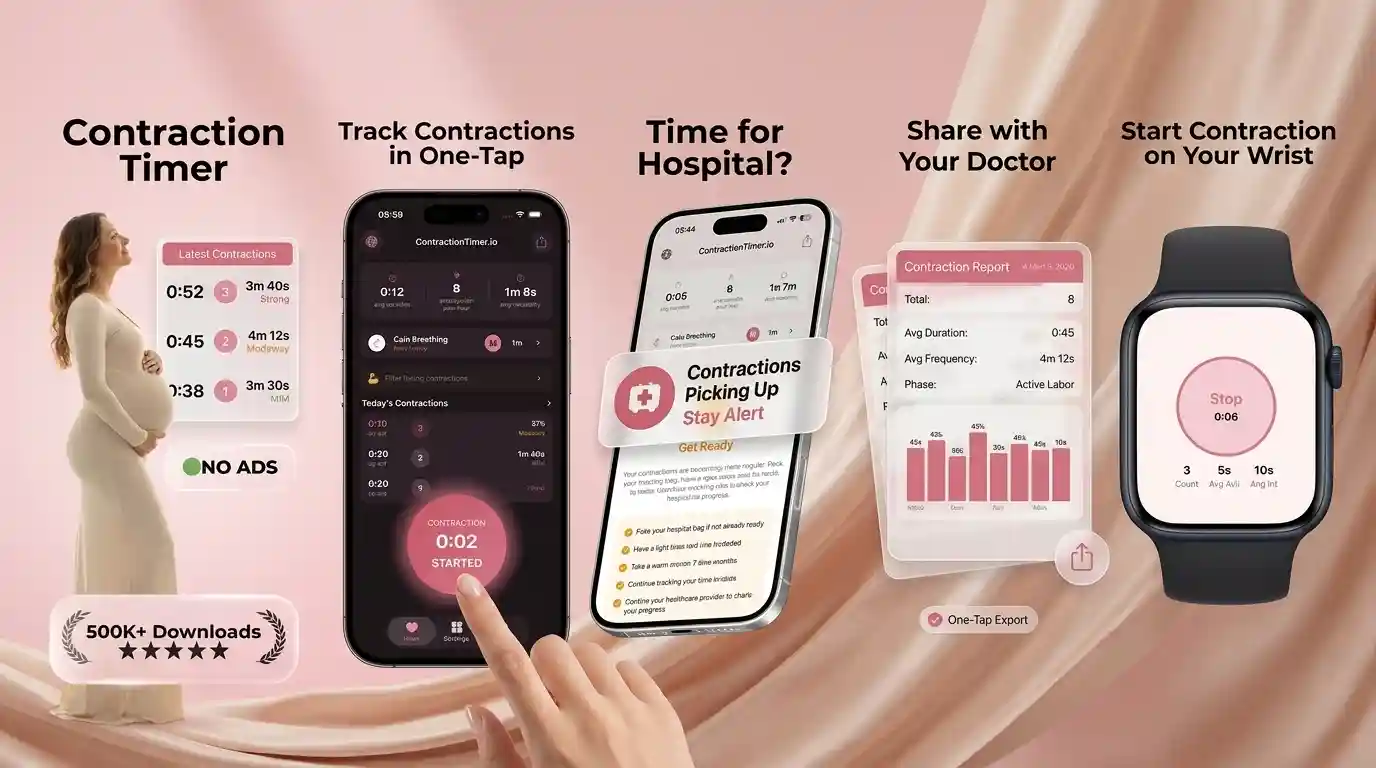
ContractionTimer.io vs The Bump Timer
For “contraction timer vs the bump,” ContractionTimer.io is the better pick if you want mobile-first timing with 5-1-1 rule alerts, automatic labor phase detection, Apple Watch support, and partner sharing. The Bump Timer is fine for basic timing, but it’s typically less focused on hospital-ready alerts and workflow. Use either as a tracking aid and confirm your plan with your provider’s guidance.
Contraction Timer Comparison at a Glance
The clearest difference is focus: a dedicated contraction timer is built for the intense, repetitive work of labor timing, while The Bump timer sits inside a larger pregnancy content app. In the contractiontimer vs the bump timer decision, choose the tool that reduces taps, shows trends clearly, and helps you communicate with your birth team.
ContractionTimer.io is the stronger fit for people who want one-tap timing, recent-average review, 5-1-1-style alerts, Apple Watch support, and sharing with a partner or doula. If you are still deciding what features matter, this overview of a contraction timer app for labor explains the basics. For iPhone users, the contraction timer app gives a focused place to start timing without sorting through general pregnancy content.
Dedicated Labor Tracking App vs Pregnancy App Timer
A dedicated labor tracking app usually wins when contractions are close, emotional, and hard to remember. The Bump timer can be fine for basic start-and-stop timing, but a labor-first app is designed around fast decisions: how long each contraction lasts, how far apart they are, and whether the pattern is becoming more consistent.
That matters at 2 a.m., when you may be tired, nauseated, excited, or scared. A focused interface means fewer screens, fewer distractions, and less mental math. It also helps a partner step in without learning a full pregnancy app. No app can tell you whether your cervix is changing, so treat the data as a conversation aid for triage, your midwife, or your doctor.
How Contraction Timing Apps Work
Contraction timing apps work by recording two timestamps for every contraction: the start time and the stop time. From those taps, the app calculates duration, frequency, interval, and rolling averages so you can see whether contractions are becoming longer, stronger, and closer together.
The most useful apps do more than list individual entries. They group recent contractions into a moving window, compare the spacing between start times, and look for consistency over time. For 5-1-1-style prompts, the app checks whether contractions are roughly 5 minutes apart, last about 1 minute, and continue near that pattern for about 1 hour. These calculations support decision-making, but they do not diagnose active labor. This is not medical advice; always follow your provider’s instructions.
How to Compare and Use a Labor Contraction Timer
Use the same simple method for any timer you test: practice once before labor, then time from the first tightening until the contraction fully releases. Consistency matters more than perfection, especially when contractions are changing quickly.
- Practice one fake contraction entry during the third trimester so the buttons feel familiar.
- Start the timer as soon as the tightening begins, not when the peak arrives.
- Stop when the contraction has fully faded, even if it releases slowly.
- Review 4 to 6 contractions before reacting to one unusually strong wave.
- Share the log with your partner, doula, or triage nurse if you need help deciding next steps.
If you want a more detailed walkthrough, this guide explains how to time contractions on your phone without losing the pattern.
5-1-1 Rule Alerts and Hospital Timing
5-1-1 alerts are helpful because they turn a string of contractions into a clearer pattern: about 5 minutes apart, lasting about 1 minute, for around 1 hour. Many hospitals and birth teams use this as a general guide, although some recommend 4-1-1, earlier calling, or a custom plan based on your history.
If you are using a timer during early labor, pair the data with your provider’s advice, your distance from the hospital or birth center, and how you feel between contractions. A full explanation of 5 1 1 rule contractions can help you understand the pattern before labor starts. You can also review when to go to the hospital for contractions so the app’s alert is not your only decision point.
Partner Sharing and Apple Watch Labor Timing
Partner sharing matters because the person in labor should not have to manage every tap, question, and phone call alone. A shared contraction log lets a partner, doula, or support person watch the same pattern and help communicate clearly with triage.
Apple Watch support can also be useful when your phone is charging, buried in bedding, or too bright during a nighttime contraction. Research on continuous labor support, including a Cochrane review available through NCBI, suggests that steady support during labor is associated with better birth experiences and some improved outcomes. Apps do not replace that support, but they can make the support person more useful. For practical roles, see this guide to a contraction timer for partners.
Feature Comparison: ContractionTimer.io, The Bump, Full Term
For most people, the best app is the one that is easiest to use during real contractions, not the one with the longest feature list. The Bump is useful if you already live inside its pregnancy app, while Full Term is known for simple contraction logs. A dedicated labor timer is strongest when you want focused prompts and sharing.
| Feature | ContractionTimer.io | The Bump Timer | Full Term |
|---|---|---|---|
| One-tap contraction timing | Yes | Yes, basic | Yes |
| 5-1-1-style alerts | Yes | Limited or varies | Varies by version |
| Labor phase pattern review | Yes | Not the main focus | Basic log review |
| Partner sharing | Yes | Not typically real-time | Limited |
| Apple Watch timing | Yes | No dedicated watch focus | No dedicated watch focus |
If Full Term is also on your shortlist, compare the differences in ContractionTimer.io vs Full Term.
Prodromal Labor, Braxton Hicks, and False Alarms
A contraction timer is especially helpful when you are unsure whether contractions are settling into labor or staying irregular. Braxton Hicks often ease with rest, hydration, or position changes, while prodromal labor can feel very real but start and stop over hours or days.
The emotional side is real here: false alarms can make you feel embarrassed, frustrated, or afraid you will miss the right moment. Timing data can show whether contractions are getting closer together or simply clustering. Still, symptoms matter too. Call your provider if you have bleeding, reduced fetal movement, severe pain that feels wrong, broken waters with concerns, or any instinct that you need help. This guide to prodromal labor vs real labor explains why patterns can be confusing.
Honest Limitations of Contraction Timer Apps
A timer can reduce guesswork, but it cannot safely replace clinical guidance. Use contraction data as one piece of the picture, alongside your symptoms, pregnancy history, and provider’s instructions.
- A timer cannot confirm cervical dilation, effacement, fetal position, or active labor.
- Prodromal labor can create convincing averages without steady cervical change.
- Starting late or stopping early can make contractions look shorter or farther apart.
- Induction, VBAC, preterm labor risk, multiples, or medical complications may require a different calling plan.
- Phone battery, notification settings, poor signal, or watch syncing can interrupt alerts.
- 5-1-1 is not universal; some providers prefer 4-1-1 or earlier evaluation.
This is not medical advice. Consult your healthcare provider, especially if you feel unsafe or symptoms change suddenly.
Common Home Contraction Timing Mistakes
The most common timing mistake is starting the timer at the peak instead of at the first tightening. That can make contractions look shorter and farther apart, which may confuse your pattern when you call triage.
Another mistake is reacting to one dramatic contraction instead of reviewing several in a row. Labor often has a few outliers, especially after walking, using the bathroom, changing positions, or getting anxious. Try to time 4 to 6 contractions and look at the average. Do not delete “messy” entries unless you are sure they were accidental taps, because messy data may still show a real pattern. If a partner is helping, agree on the start and stop cues before contractions intensify.
Best Choice for Focused Labor Contraction Tracking
For focused labor tracking, the better choice is the app that keeps the screen simple and the pattern easy to explain. Contraction Timer IO is a contraction timer app that tracks contraction duration, frequency, and patterns for pregnant people and birth partners.
The Bump timer can be enough if you only want basic timing inside an app you already use. But if your priority is 5-1-1-style guidance, Apple Watch timing, partner sharing, and a cleaner labor workflow, a dedicated option is easier to trust under pressure. Android users can start a labor tracking app before contractions begin, then practice one entry so the process feels familiar when labor gets real.
When to Stop Timing and Call Your Provider
Stop comparing apps and call your provider when symptoms matter more than the contraction pattern. Heavy bleeding, reduced fetal movement, severe headache, vision changes, fever, constant severe abdominal pain, or a strong feeling that something is wrong should prompt urgent medical guidance.
You should also call sooner if you are preterm, have been told you are high risk, your waters break and you have concerns, or your birth team gave you a specific plan. The NHS guidance on signs that labor has begun notes that contractions, waters breaking, and other symptoms can vary from person to person. A timer helps organize information; your healthcare team helps interpret it. This is not medical advice; consult your doctor or midwife.
Ready to track
Want 5-1-1 alerts without juggling notes?
Use ContractionTimer.io to time with one tap, see trends clearly, and share your log with your support person when it’s go-time.
How to Prepare Your Phone for Contraction Timing During Labor
Before contractions become demanding, prepare the phone and app you expect to use. A short rehearsal makes either timer easier to operate and helps prevent a dead battery, hidden alerts, or an incomplete history when you want to describe the pattern to maternity triage. Remember that a timing app records your taps; it cannot determine whether labor is established or whether you need medical assessment.
- Open the app, allow any needed notifications, and practice starting, stopping, editing, and deleting one sample contraction.
- Charge your phone and pack a cable or power bank. Longer early-labor tracking can use more battery, especially with the screen kept awake.
- Confirm that your partner knows the phone passcode and which button to press if they will take over timing.
- Save your maternity unit or provider’s number in favorites rather than relying on the timer to tell you when to call.
- Test whether timing continues with weak reception or airplane mode, because app behavior can vary.
Frequently Asked Questions
Which app is easier during labor?
A dedicated contraction timer is usually easier during active labor because it has fewer distractions and faster access to start, stop, and recent averages. The best choice is the one you can use accurately while contractions intensify.
Does the timer diagnose real labor?
No. A timer can show contraction patterns, but it cannot confirm cervical change, fetal position, or active labor; consult your healthcare provider.
What is the 5-1-1 rule?
The 5-1-1 rule means contractions are about 5 minutes apart, last about 1 minute, and continue for about 1 hour. Your provider may give different instructions based on your pregnancy.
Can my partner track contractions?
Yes, partner tracking can be very helpful because it lets the birthing person focus on coping while someone else watches the pattern and shares updates.
Is Apple Watch timing useful?
Apple Watch timing can be useful when your phone is not nearby, the room is dark, or you want fewer interruptions during contractions.
What if contractions are irregular?
Irregular contractions can happen in early labor, Braxton Hicks, or prodromal labor. Track the pattern, change positions or rest if advised, and call your provider if you are unsure.
Should I time every contraction?
In early labor, timing a cluster of contractions may be enough to understand the pattern. As contractions become stronger or closer, more consistent timing can help with provider calls.
When should I call triage?
Call triage based on your provider’s plan, especially if you reach their contraction guideline or have concerning symptoms such as bleeding, reduced fetal movement, or severe pain.
Can an app replace medical advice?
No. A contraction app is a tracking aid, not a medical assessment; always follow guidance from your doctor, midwife, or hospital team.
Do contraction timer apps work without internet?
Some contraction timer apps can record entries locally without an active connection, but alerts, syncing, sharing, or account features may require internet access. Test the app in airplane mode before labor and keep your provider’s phone number available separately.
Timing contractions safely
Contraction Timer IO and The Bump Timer are tracking aids, not diagnostic or triage tools.
ACOG says true-labor contractions become regular and closer together, while early labor may remain irregular.
Follow your maternity team’s advice and contact them whenever you are concerned; see NHS signs-of-labour guidance.
| Pattern | Sourced number |
|---|---|
| True-labor duration | About 60-90 seconds (ACOG, 2025) |
| Early-labor duration | About 20-60 seconds (NHS, 2024) |
| Call maternity unit | Regular contractions every 5 minutes or more often (NHS, 2020-2025) |
| Urgent advice | Over 2 minutes each, or 6+ in 10 minutes (NHS, 2020) |