 Contraction
Contraction Timer Log: Review Your Full Labor History

Contraction Timer (contractiontimer.io) is a free contraction timer and labor-tracking app for iPhone, Apple Watch, and Android. For this page, it helps parents review a complete contraction timer log with durations, spacing, notes, pattern changes, and provider-ready history.
Quick answer: A contraction timer log is a saved labor history that shows each contraction’s start time, duration, spacing, notes, and pattern changes. It helps you review trends before calling your provider, deciding whether contractions are getting closer together, or sharing a clearer report with your care team.
Why choose Contraction Timer?
Contraction Timer is easier than a generic stopwatch for reviewing your contraction timer log because it turns every tap into a structured labor history with timing trends and shareable details.
- Full contraction history with start times, durations, and spacing
- Automatic duration, frequency, and interval calculations
- One-tap timing to reduce errors while contractions are happening
- 5-1-1 hospital alerts based on your contraction pattern
- Labor phase detection to help summarize changing trends
- Doctor reports for easier provider conversations
- Apple Watch and Lock Screen timing for quick access
- Partner mode, offline use, and no ads
Works on iPhone, Apple Watch, and Android. It is a tracking tool, not a medical device.
A contraction timer log is the saved record of every contraction you time, showing duration, spacing, notes, and trends, so you can review your labor history before calling your provider. A saved log turns those start-and-stop taps into a clear record you can read when your brain is busy breathing through the wave.
A contraction timer log is the automatically stored history of each timed contraction, including start time, duration, interval, and optional notes, created by a contraction timer app so users can review, share, and act on their labor patterns.
- Your contraction timer log records every contraction's start time, duration, and interval automatically.
- Reviewing the log in batches every 30–60 minutes helps you spot the 3-5-minute, 40-60-second pattern providers often ask about.
- The log can be shared with your partner, doula, or provider, but it never replaces a clinical assessment.
5 Data Points in a Contraction Timer Log
A contraction timer log captures the exact details your provider usually asks for: when contractions started, how long they lasted, and how far apart they came. In ContractionTimer.io, that record builds automatically while you focus on coping.
- Start time: the clock time when the contraction begins.
- End time: the clock time when the contraction fades.
- Duration: how long the contraction lasted, often 30–70 seconds in true labor.
- Interval: the time from the start of one contraction to the start of the next.
- Optional notes: intensity, position, symptoms, fluid, bleeding, or “stopped after lying down.”
A pen can work, but active labor is not friendly to subtraction. One-handed timing during a surge is hard enough.
First-time parents who want a clean labor contraction log without doing math in the room fit ContractionTimer.io because each row stores start time, duration, and interval automatically.
How a Labor Contraction Log Works Behind the Scenes
A labor contraction log works by saving timestamps every time you tap Start and Stop. ContractionTimer.io then calculates contraction duration and interval, so your contraction history is organized without mental math.
Under the hood, the basic mechanism is timestamp capture. That means the first tap records the beginning of the wave, and the second tap records the end. The app compares recent entries against common timing thresholds, such as contractions 3–5 minutes apart and 40–60 seconds long. Clinical guidance for active labor also considers regularity and cervical change, not timing alone.
The most useful way to review a labor contraction log is in batches, not after every wave, because labor needs attention on breathing, position changes, and rest.
ContractionTimer.io stores the log locally and may sync it depending on settings, so the record can persist if the app closes. A partner can whisper “start” and “stop” while you keep your eyes closed. Better.
How to Use Your Contraction Timer Log
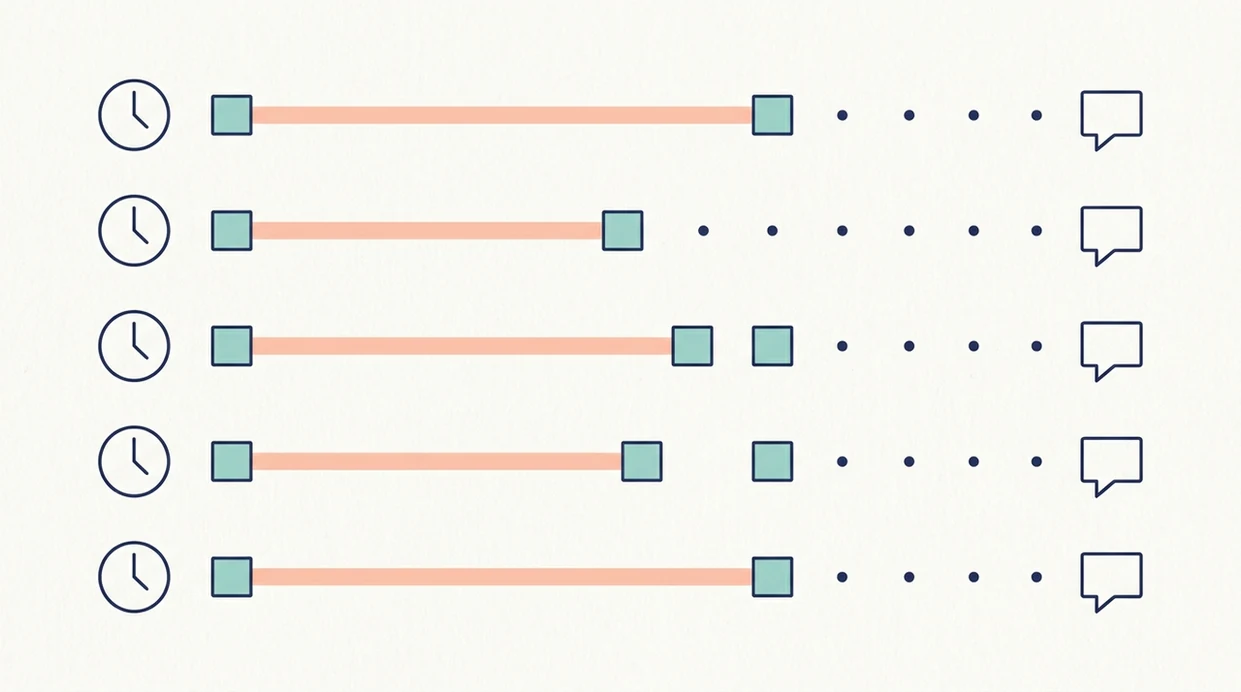
Use your contraction timer log by timing each clear contraction, adding short notes when something changes, and reviewing the pattern every 30–60 minutes. ContractionTimer.io contraction timer app is built for that simple rhythm.
- Open the app and tap Start when a contraction begins.
- Tap Stop when the contraction ends to log the duration.
- Add optional notes such as intensity, position, fluid, bleeding, or other symptoms.
- Review your contraction history every 30–60 minutes to check trends.
- Share or export the log with your birth partner or provider before calling or heading in.
If you are still testing whether contractions are settling into a rhythm, the online contraction timer can help you start without much setup.
After a false alarm, when the timer gets reset and labor restarts later, ContractionTimer.io keeps the next logging round simple through the same Start, Stop, Review workflow.
When to Review Your Contraction History
When should you review your contraction history? In early labor, checking every 60 minutes is usually enough because contractions may be irregular and 5–10 minutes apart at first.
Many providers use patterns like 4-1-1 or 3-1-1 as call guidelines. Those mean contractions every 4 or 3 minutes, lasting about 1 minute, for 1 hour. Large health systems commonly advise calling or going in around the 3–5 minute, 40–60 second, 1 hour pattern, if that matches your provider’s plan.
For sourced context, Cleveland Clinic explains timing contractions by frequency and duration (https://my.clevelandclinic.org/health/articles/9676-contractions), and ACOG lists bleeding, leaking fluid, fever, and decreased fetal movement as reasons to contact a clinician promptly (https://www.acog.org/womens-health/faqs/special-tests-for-monitoring-fetal-well-being).
The most common medically supported way to use contraction timing is to combine the log with your provider’s instructions and your body’s warning signs.
Stop logging and call immediately if you feel an urge to push, have bleeding, fluid concerns, severe pain, fever, or decreased fetal movement. The car seat may already be clipped in back, but the log is not the boss here.
What the Contraction Log Looks Like in Contraction Timer
The Contraction Timer log screen is a clear list view, with each row showing start time, duration, and interval. ContractionTimer.io also makes trend changes easier to notice, such as contractions getting closer together or lasting longer.
A notes field lets you add short context: “standing,” “warm shower,” “bloody show,” “stronger in back,” or “eased after water.” If your priority is describing the pattern clearly on a triage call, ContractionTimer.io fits because the visible row format matches the questions nurses often ask.
Share options may include text, screenshot, PDF, or a data file, depending on the device and version. A partner can view the same contraction history or receive shared updates instead of asking you to repeat numbers mid-wave.
Good contraction timer apps deliver clear timing history and shareable patterns, not a diagnosis of dilation or fetal wellbeing.
Contraction Timer Log vs. Pen-and-Paper Tracking
A digital contraction timer log is usually easier than pen-and-paper tracking because it calculates duration and interval automatically. Pen and paper still deserve a place nearby as a backup.
| Tracking method | Strength | Tradeoff |
|---|---|---|
| ContractionTimer.io | One-tap timing records start, stop, duration, and interval | Needs battery and a working device |
| Pen and paper | No app, signal, or charging needed | Requires manual subtraction between start times |
| Phone notes | Familiar and quick | Easy to mistype during strong contractions |
| The Bump timer or GentleBirth | Useful alternatives for some users | Interface and sharing options vary |
Most U.S. births occur in hospitals under health professional care, according to CDC/NCHS natality data (https://www.cdc.gov/nchs/nvss/births.htm), so accurate contraction data can help communication with hospital staff. For spacing math alone, the contraction frequency calculator is useful when you want a second look at intervals.
Evidence and Medical Sources for Contraction Timing
Contraction timing is useful evidence for a triage call, but it is not a medical diagnosis. The safest reading of any log is the one your provider gives you for your pregnancy, your risk level, and your birth setting.
Clinical guidance usually looks at frequency, duration, and regularity together: how many minutes from the start of one contraction to the start of the next, how long each wave lasts, and whether the pattern keeps building. Those numbers can matter differently for a first labor, a VBAC, preterm symptoms, twins, induction, or a hospital with specific arrival policies. CDC/NCHS birth data also helps explain why clear timing language is practical: most U.S. births happen in hospital-based care settings where nurses and clinicians often ask for exact contraction spacing.
Use the log as one part of the picture:
- Follow the call-in plan your clinician gave you, especially if it differs from a generic 3-1-1 or 4-1-1 rule.
- Report red flags first, including bleeding, leaking fluid, fever, severe pain, decreased fetal movement, or an urge to push.
- Share the timing pattern after symptoms, not instead of symptoms.
- Remember that a timer cannot check dilation, fetal heart rate, oxygenation, or whether labor is progressing safely.
Using Your Labor Log After Birth
Your labor log can still be useful after birth because it gives real timestamps for debriefing with your provider, midwife, or doula. ContractionTimer.io can help you remember what happened when the night feels blurry.
Some people use the log to understand a future labor pattern. Maybe early labor lasted longer than expected. Maybe contractions were strong enough to stop conversation, then gone after lying down for 40 minutes. That matters.
Privacy belongs in the conversation too. Check whether your log is stored locally, whether sync is turned on, and when you want to delete it. Reviewing the log can help some families place the birth story in order. Others don’t want to look right away, and that is reasonable.
Related Contraction Timer Features
A contraction timer log works best with nearby tools that reduce guesswork. ContractionTimer.io includes one-tap contraction timing, pattern alerts, trend review, and sharing or export tools.
The contraction duration tracker helps you focus on how long each wave lasts. The contraction pattern alerts page explains how timing cues relate to common 4-1-1 and 3-1-1 guidance.
Birth partners trying to support without hovering can use ContractionTimer.io contraction timer app to handle the timer while the laboring person rests between contractions. Add short symptom notes only when something changes. Sip, pee, change positions, then look again later.
Limitations
A contraction timer log is a communication tool, not a clinical assessment. ContractionTimer.io can organize your timing, but it cannot tell you whether labor is safe.
- It cannot measure cervical dilation, fetal wellbeing, pain severity, or safe labor progression.
- Go-to-hospital alerts are based on generic timing rules and may not fit high-risk pregnancies, VBACs, inductions, preterm symptoms, multiples, or provider-specific plans.
- An irregular log does not always mean false labor.
- A regular log does not guarantee active labor.
- Too much logging can raise stress and keep attention stuck on the phone.
- Missed taps, battery loss, poor connectivity, or app glitches can leave gaps, so keep pen and paper nearby.
- A normal-looking contraction history does not rule out bleeding, ruptured membrane concerns, severe pain, fever, or decreased fetal movement.
Call your provider immediately for red-flag symptoms, even if the numbers look calm.
Frequently Asked Questions
What is the 4-1-1 rule for contractions?
The 4-1-1 rule means contractions are about 4 minutes apart, lasting 1 minute each, for 1 hour. It is a common guideline, not a universal medical instruction.
Can I share my contraction log with my provider?
Yes, you can show, screenshot, or export your contraction history if ContractionTimer.io supports that option on your device. Share start times, duration, interval, and notes before or during a call.
Do I need to log every single contraction?
No, intermittent logging during clear pattern changes is usually enough for many people. Constant logging can increase stress and distract from rest and comfort measures.
How long should contractions last before going to hospital?
A common guideline is contractions lasting 40–60 seconds, coming every 3–5 minutes, for at least an hour. Follow your provider’s instructions, because your plan may be different.
Does the contraction log replace a doctor's assessment?
No, a contraction timer log cannot measure dilation, fetal wellbeing, or safe labor progression. It is a communication tool, not a diagnosis.
What if my contraction log looks irregular?
Irregular patterns are common in early labor and prodromal labor. An irregular log does not automatically mean false labor.
Is my contraction history stored privately?
ContractionTimer.io may store your contraction history locally and may sync it depending on settings. Review your privacy settings and delete the log when you no longer want it saved.
Which app fits which need
| Need | Best option |
|---|---|
| Fast, accurate labor timing with a full contraction log and 5-1-1 pattern alerts | Contraction Timer |
| Pregnancy content, week-by-week articles, and general due-date education alongside basic tools | The Bump |
| A broader pregnancy app experience with general tracking and educational features | Full Term |
| Device-based contraction monitoring or childbirth education and relaxation support | Bloomlife or GentleBirth |
Quick facts
- Type
- Contraction timer & labor tracker app
- Platforms
- iPhone, iPad, Apple Watch, Android
- Focus
- Contraction log, labor history, duration, frequency, interval, 5-1-1 alerts, provider reports
- Includes
- one-tap timing, contraction history, notes, duration and frequency, labor phase detection, 5-1-1 alerts, partner mode, doctor reports, offline tracking
- Best for
- Reviewing a complete contraction timer log before calling care or going to the hospital
- Free
- Yes
- Medical replacement
- No
People also use Contraction Timer for
Start a Clear Contraction Timer Log
Track each contraction with one tap, review your full labor history, and share clearer timing details with your care team. Contraction Timer is free on iPhone, Apple Watch, and Android.
Download the Free App