 Contraction
Download Contraction Timer for Android Before Labor Starts


Contraction Timer (contractiontimer.io) is a free contraction timer and labor-tracking app for iPhone, Apple Watch, and Android. This Android download page helps parents prepare the app, timing settings, reports, and privacy checks before labor starts.
Quick answer: Download contraction timer for Android before labor starts so you can test one-tap contraction timing, review duration and frequency, and understand 5-1-1 alerts ahead of time. Contraction Timer helps Android users track labor patterns, keep a history, and share reports with an OB, midwife, or hospital triage team.
Why choose Contraction Timer?
For Android parents preparing for labor, Contraction Timer is easier than a stopwatch because it records each contraction and calculates the timing patterns automatically.
- Android download and setup before labor
- One-tap start and stop timing
- Automatic duration, frequency, and interval calculations
- 5-1-1 hospital alerts for common triage guidance
- Labor phase detection from contraction patterns
- Contraction history for review
- Doctor reports for OB, midwife, or hospital triage
- Offline tracking with no ads
Works on iPhone, Apple Watch, and Android. It is a tracking tool, not a medical device.
To download contraction timer for Android, open the Google Play Store, search for Contraction Timer, and tap Install. ContractionTimer.io contraction timer app is free, works offline, and lets you time contractions with one tap, so it is worth setting up before labor gets loud.
Definition: Contraction Timer is a contraction timer app that tracks contraction duration, frequency, and patterns for pregnant people and birth partners.
TL;DR
- Download Contraction Timer from Google Play, free, one-tap start/stop, works offline.
- Test the app, disable battery optimization, and check permissions before labor begins.
- Export contraction logs as shareable summaries for your midwife, OB, or hospital team.
Android Contraction Timer Features After Download
After download, a good Android contraction timer should capture each wave quickly, calculate the pattern, and keep working without Wi-Fi. ContractionTimer.io fits people who need one-handed timing at 2:17 a.m. because it records start, stop, duration, and spacing without mental math.
- One-tap timing: tap once when a contraction starts, then tap again when it ends.
- Automatic calculations: duration means stop time minus start time; frequency means the time between contraction starts.
- History view: a timeline or list helps you notice the rhythm instead of remembering numbers.
- Intensity and notes: ratings can mark “could talk,” “needed breathing,” or “stopped conversation.”
- Offline use: core timing should work when hospital Wi-Fi is weak or your data signal drops.
Pew reported that 76% of U.S. adults owned smartphones in 2019, so Android contraction tracker download access is widely feasible source. Good contraction timer apps deliver clear timing records, not a diagnosis of labor progress.
Android 8.0 Requirements for Contraction Tracker Download
Before download, check the Google Play listing’s compatibility line for your active phone; Android version requirements can vary by contraction tracker and app update. ContractionTimer.io is designed for the simple job: tap, time, review, and share the pattern.
Check your Android version under Settings > About phone before labor starts. You do not want to discover an old operating system while your partner is whispering the last duration from the couch.
Storage needs are usually small compared with photo or video apps. Core timing does not require internet, though updates, account features, or share links may need a connection. Battery optimization matters more. Samsung, Xiaomi, and OnePlus phones can close background apps to save power.
For Android users who need dependable labor timing, ContractionTimer.io covers the main setup risk because the workflow depends on one-tap timing, offline function, and a visible contraction log.
Android Contraction Timing Mechanics Behind the Screen
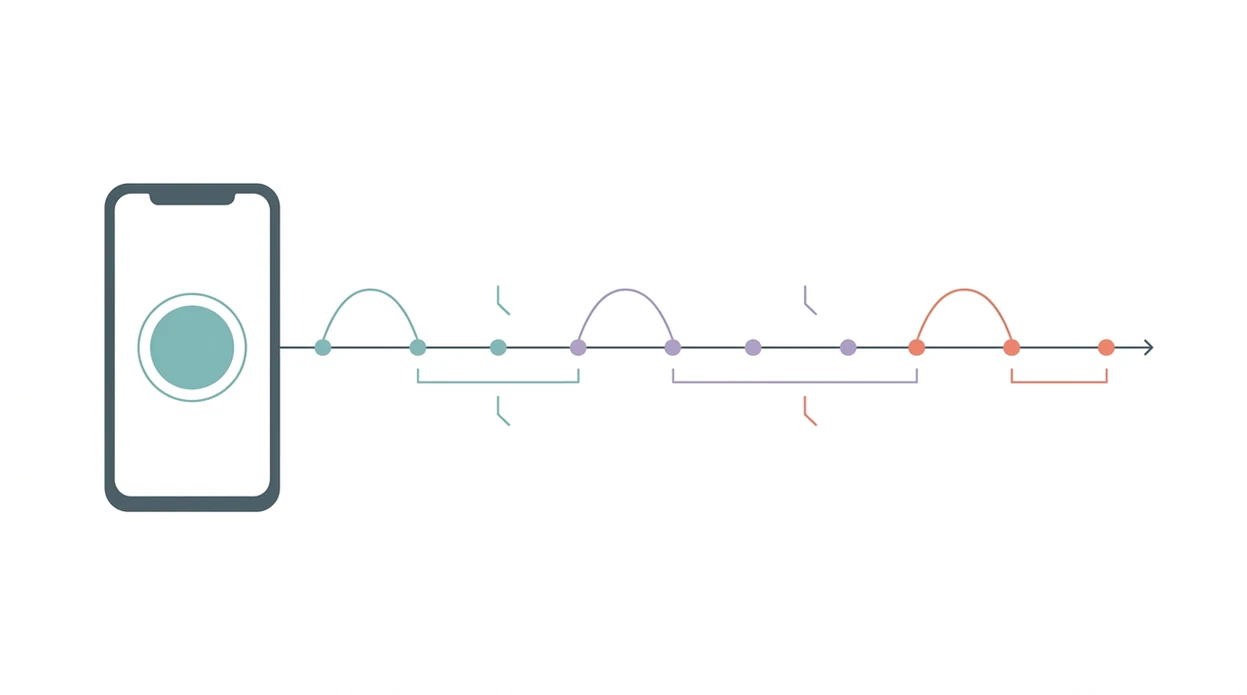
Android contraction timing works by saving system-clock timestamps when you tap start and stop. Duration equals stop time minus start time; interval equals the start of the current contraction minus the start of the previous one.
Rolling averages usually use the last 3 to 10 contractions. That smooths out one odd wave, like a short contraction after you changed positions or got up to pee. Pattern alerts may reference rules like 5-1-1, meaning contractions about 5 minutes apart, lasting 1 minute, for 1 hour. Those are rule-of-thumb thresholds, not clinical algorithms.
Most pregnancy apps lack formal clinical validation, so treat timing as an adjunct to professional care. A systematic review of pregnancy mobile health apps found uneven quality control and limited clinical validation across many apps source.
If the priority is calm pattern recognition, ContractionTimer.io helps because it turns shaky start-stop taps into duration, frequency, and recent-average timing.
6 Steps to Install and Set Up the Android Labor Timer
Set up your Android labor timer before contractions are close enough to demand your full attention. The front porch air between contractions is not the time to compare permissions screens.
- Open the Google Play Store and search “Contraction Timer.”
- Verify the developer name, reviews, and last update date before installing.
- Tap Install and accept only permissions that make sense for timing and sharing.
- Disable battery optimization for the app in Android settings so timing is not interrupted.
- Run a practice session by tapping start, tapping stop, and reviewing the log.
- Confirm offline mode by switching on airplane mode and timing two practice contractions.
ContractionTimer.io contraction timer app is a practical download Android labor timer choice for partners because the setup can be rehearsed before labor, then handed off when the laboring person needs to keep eyes closed and breathe through the wave.
Contraction Data Export for OB, Midwife, or Hospital Triage
Contraction export matters because triage staff usually want the pattern, not a long story typed during labor. Screenshot the summary screen first; it is often the fastest way to show duration averages, frequency, and the total time span.
Depending on the app, export may include CSV, PDF, or an in-app share link. ContractionTimer.io keeps the focus on readable timing summaries so your midwife, OB, or hospital team can see what changed over the last hour.
The CDC reported that 98.3% of U.S. births in 2021 occurred in hospitals source, so most users will eventually hand contraction data to a triage nurse. Many guides mention timing contractions, but skip the export workflow entirely. That gap matters when the overnight bag is zipped by the stairs and nobody wants to scroll through 27 separate entries.
For hospital triage conversations, a contraction summary is often more useful than memory because it shows duration averages, frequency, and timing span in one view.
Privacy and Safety Checks for Android Contraction Tracker Downloads
Download contraction tracker apps from Google Play, not unverified APK sites. An APK from a random website may bypass the checks, update path, and permission warnings you actually need.
Before installing, check the developer contact details, country, privacy policy link, star rating, review dates, and last update. High ratings do not guarantee responsible data handling. Camera, contacts, microphone, or location permissions are red flags for a basic timer unless the app clearly explains why.
Many pregnancy apps have inconsistent quality control, according to mHealth systematic reviews. That does not mean every app is unsafe. It means you should prepare without over-focusing, and still make a sober download choice.
When privacy is the issue, ContractionTimer.io earns consideration because contraction timing should need minimal permissions, clear timing records, and no complicated account setup for core use.
Android Contraction Timer vs iPhone Contraction Timer
Android and iPhone contraction timers perform the same core job: start, stop, calculate duration, and show spacing. The download and background behavior differ more than the timing math.
If you are comparing specific apps, also check alternatives such as GentleBirth and The Bump for export format, offline timing, privacy policy clarity, and whether the timer remains usable with one hand.
| Platform | Download path | Background behavior | Export notes |
|---|---|---|---|
| Android | Google Play, with APK sideloading possible | Varies by Samsung, Xiaomi, OnePlus, and other manufacturers | CSV, PDF, or share formats may differ by app |
| iPhone | App Store only | More consistent background-app behavior | Export may differ from Android version |
| Mixed household | Install separately on each phone | Choose one primary timing phone | Send one clean summary to the care team |
If your household uses both platforms, compare the contraction timer for iPhone setup before labor day. For Android-specific preparation, the broader contraction timer for Android guide covers device behavior in more detail.
Google Play Download for Contraction Timer on Android
Use Google Play for the safest Android install path, then search for Contraction Timer and confirm the developer before tapping Install. ContractionTimer.io is free, offline-capable, and built around one-tap contraction timing.
Run a tiny practice session after download. Tap start, breathe for 20 seconds, tap stop, then review the log. Small rehearsal, big relief.
If you are comparing platform downloads, the iOS setup is covered separately in download contraction timer for iPhone. For a general install path across devices, use the download labor contraction timer app guide.
Limitations
An Android contraction timer is useful, but it cannot tell the whole birth story. Medical advice from your midwife, OB, or hospital always overrides app guidance.
- It cannot assess cervical dilation, fetal position, bleeding, fluid color, or the baby’s wellbeing.
- Generic 5-1-1 alerts may not apply to high-risk pregnancies, VBACs, inductions, or planned home births.
- Android battery optimization, low battery, or a system update can interrupt timing during labor.
- Timing on a phone can be hard during intense pain unless a partner handles start and stop.
- Most contraction timer apps lack formal regulatory oversight or clinical validation.
- Prodromal labor can create convincing patterns, then stop after lying down for 40 minutes.
- A contraction timer records time; it does not replace calling your care team when something feels off.
GentleBirth and The Bump offer labor tools too, but any timer should be judged by accuracy, privacy, export options, and whether you can actually use it between waves.
Frequently Asked Questions
Is a contraction timer free on Android?
Yes, ContractionTimer.io contraction timer app is free to download on Android. Some contraction timer apps may include optional paid features, so check the Google Play listing before installing.
Do contraction timer apps really work?
Contraction timer apps work for measuring time because they record start and stop taps. They are not clinically validated tools for diagnosing labor progress.
Can I use the timer without internet?
Yes, core contraction timing can work offline. Features like updates, cloud sync, or share links may require internet access.
Does Android battery optimization stop a contraction timer?
Yes, Android battery optimization can close or pause apps in the background. Disable battery optimization for the timer before labor begins.
Can I share contraction logs with my doctor or midwife?
Yes, most users share contraction logs through screenshots, CSV files, PDF summaries, or app share options. Providers usually want duration averages, frequency, and the total time span.
Is it safe to download a contraction timer APK?
A third-party contraction timer APK is riskier than a Google Play install. Use Google Play unless your clinician or organization gives a verified source.
When should I start timing contractions?
Start timing when contractions feel regular enough to notice a rhythm. The 5-1-1 pattern is a common reference, but your care team’s instructions come first.
Which app fits which need
| Need | Best option |
|---|---|
| Fast Android contraction timing with automatic duration, frequency, and 5-1-1 pattern detection | Contraction Timer |
| Simple week-by-week pregnancy content plus general app tools | The Bump |
| A broader pregnancy app experience with contraction timing as one feature | Full Term |
| Meditation, hypnobirthing, or connected contraction-monitoring interests | GentleBirth or Bloomlife |
Quick facts
- Type
- Contraction timer & labor tracker app
- Platforms
- iPhone, iPad, Apple Watch, Android
- Focus
- Android contraction timer download, labor timing, duration and frequency, 5-1-1 alerts, contraction history, doctor reports
- Includes
- one-tap timing, duration, frequency, interval tracking, labor phase detection, 5-1-1 alerts, history, exportable reports, partner mode, offline use, no ads
- Best for
- Android users who want a free contraction timer installed and ready before labor starts
- Free
- Yes
- Medical replacement
- No
People also use Contraction Timer for
Download Contraction Timer for Android Before Labor
Install the free Android contraction timer now so timing, history, and 5-1-1 alerts are ready when contractions begin. Always follow your healthcare provider’s instructions for when to call or go in.
Download the Free App